
AI video generation has transformed from a novelty into a production tool. By mid-2026, the landscape has shifted dramatically. Two platforms have emerged at the forefront: Google’s Gemini Omni Flash, which launched to developers in June 2026, and Runway’s Gen-4.5, which repositioned the platform toward professional workflows in late 2025.
These tools represent fundamentally different philosophies. Gemini Omni Flash prioritizes speed and conversational editing—you generate a clip, then refine it through natural language instructions without re-prompting. Runway Gen-4.5 optimizes for creative control and cinematic quality, giving you precision over camera movements, lighting, and character consistency across long-form content.
Choosing between them depends on how you work. If you iterate rapidly and value quick feedback loops, Gemini Omni Flash’s $0.10-per-second pricing and multi-turn editing workflow will resonate. If you need broadcast-grade output and granular control over every shot, Runway’s professional toolset justifies the premium cost.
This comparison pulls from official documentation, API pricing, independent benchmarks, and real production workflows to help you decide which tool fits your needs.
Quick Answer
Best overall: Runway Gen-4.5 (professional quality, most creative control)
Best value: Gemini Omni Flash (lowest cost per generation, fastest iteration)
Best for creators: Runway Gen-4.5 (character consistency, longer clips)
Best for filmmakers: Runway Gen-4.5 (camera controls, cinematic precision)
Best for marketers: Gemini Omni Flash (fast turnaround, cost-efficient at volume)
Best for businesses: Runway Gen-4.5 (production-ready output, fewer iterations needed)
Best free option: Runway Free tier (limited but usable; Gemini Omni Flash requires paid subscription)
Feature Comparison Table
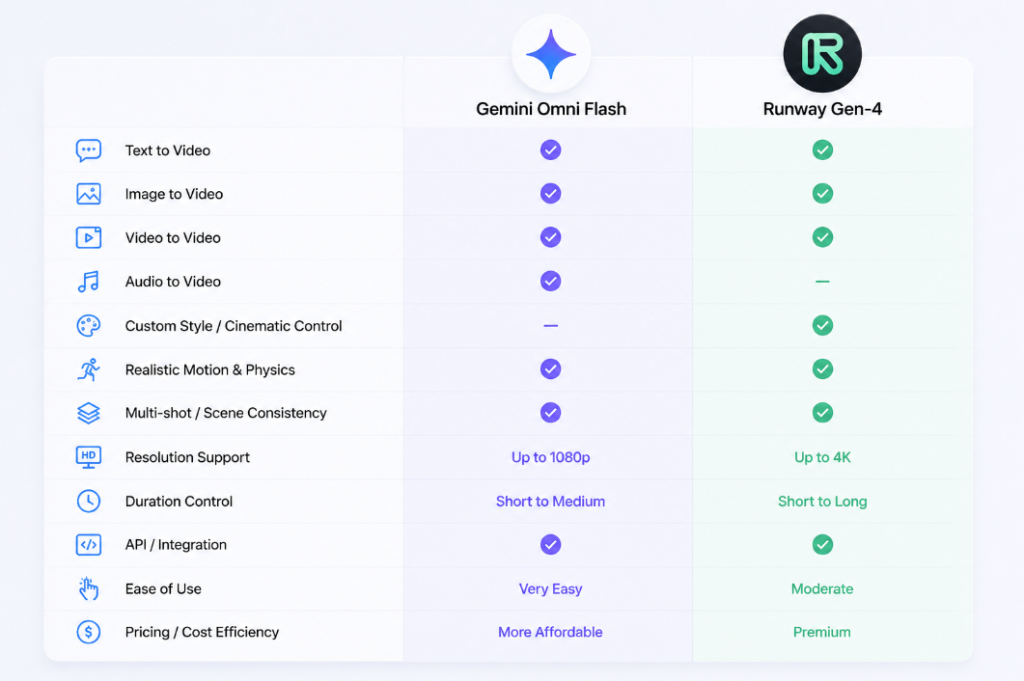
| Feature | Gemini Omni Flash | Runway Gen-4.5 |
| Developer | Google DeepMind | Runway ML |
| Release | June 2026 (API) | December 2025 |
| Core Model | Omni (multimodal) | Gen-4.5 (specialized video) |
| Text-to-Video | Yes, via conversational prompts | Yes, primary strength |
| Image-to-Video | Yes, up to 7 reference images | Yes, strong character consistency |
| Video Editing | Native, via conversation | Native, Motion Brush + Director Mode |
| Native Audio | Yes, generated in-pass | Yes, with voice cloning options |
| Prompt Understanding | Strong (reasoning-based) | Excellent (specialized model) |
| Character Consistency | Moderate, single-scene focus | Excellent, across multiple scenes |
| Motion Quality | Fast and natural | Cinematic and precise |
| Camera Controls | Basic (conversational) | Advanced (Motion Brush, framing) |
| Output Resolution | 720p only | Up to 4K |
| Max Clip Length | 10 seconds | 1 minute |
| Generation Speed | Very fast (<30 seconds typical) | Moderate (60-120 seconds typical) |
| Rendering Time | <30 seconds | 2-3 minutes depending on settings |
| Workflow | Iterative, conversational | Sequential, controlled |
| Collaboration | Limited (via Gemini app) | Full team workspaces (up to 10 users) |
| API Available | Yes (gemini-omni-flash-preview) | Yes (Gen-4 Turbo only; Gen-4.5 not yet) |
| Pricing Model | Per-second usage or monthly credits | Credit-based subscription |
| Free Tier | No (YouTube Shorts only) | Limited (125 one-time credits) |
| Commercial Use | Allowed on paid plans | Allowed on all paid plans |
| Best Use Cases | Fast iteration, social content | Hero shots, brand films, long-form |
What Is Gemini Omni Flash?
Gemini Omni Flash is Google’s first model in the Omni family, launched publicly at Google I/O on May 19, 2026, and opened to developers via the Gemini API on June 30, 2026. It’s not a specialized video-only model—it’s a multimodal reasoning engine designed to handle video generation and editing as part of a broader understanding of text, images, and video simultaneously.
Technology & Architecture
The Omni family collapses what used to be separate stacks (Veo for video, Imagen for images, separate audio systems) into one unified model. This architectural choice matters more than marketing copy suggests. Omni understands physical relationships between objects and environments, so when you ask it to change a background, it doesn’t just composite—it recomputes the lighting, shadows, and physics relative to the new scene.
Multimodal Capabilities
You can feed Omni any combination of: text prompts, up to seven reference images, existing video clips, or audio. The model processes all of it together and generates video output with synchronized audio in a single pass. No separate voice-over step required.
Conversational Editing
This is the headline feature. Generate a product video with a white background. Then say “change the background to a scandinavian kitchen.” The model carries forward the product, camera angle, lighting, and character identity from the first generation and applies only the requested change. You can chain up to three edits via the Interactions API before starting fresh.
Google Ecosystem Integration
Omni Flash ships natively in:
- The Gemini app (for Plus, Pro, Ultra subscribers)
- Google Flow (visual editing interface)
- YouTube Shorts Remix (free for YouTube users)
- Google AI Studio (for API experimentation)
- The Gemini API (for production integration)
For teams already inside Google Workspace, this is frictionless. For everyone else, it adds another authentication step.
Strengths
- Exceptional speed: 10-second clips generate in under 30 seconds in most cases
- Native audio generation eliminates the voice-over bottleneck
- Conversational editing reduces the iteration cost substantially—refining an existing clip costs only $0.10 per second, not a full new generation
- Transparent per-second pricing with no hidden credit systems
- Strong integration with YouTube Shorts, the fastest-growing short-form platform
- Handles physics and spatial reasoning better than pure generation models
Limitations
- 720p resolution only (no 1080p or 4K available)
- 10-second maximum length per clip
- Character consistency degrades across scene changes or complex multi-person interactions
- Limited camera control options (conversational rather than parametric)
- Batch API discount (50% off) applies only via Vertex AI, not the standard Gemini API
- Still in public preview, so availability and pricing may change
What Is Runway Gen-4.5?
Runway Gen-4.5, released in December 2025, marked a strategic pivot for the platform. Earlier generations (Gen-1 through Gen-3 Alpha) excelled at video-to-video and image-to-video workflows. Gen-4 (October 2025) introduced text-to-video but suffered from weak prompt adherence. Gen-4.5 flips the priorities: text-to-video becomes the primary pathway, and the model has been retrained specifically for that strength.
Architecture & Design Philosophy
Runway is a purpose-built video generation system, not a general multimodal model like Gemini. This specialization shows. The model is trained on cinematographic principles, professional editing practices, and narrative structure. When you describe a scene, the model doesn’t just synthesize pixels—it understands framing, timing, and how shots work together.
Cinematic Generation
Gen-4.5 prioritizes visual quality and motion realism. It can generate:
- Complex scenes with multiple subjects and layered actions
- Consistent lighting across scenes
- Realistic physics (water, cloth, liquids)
- Subtle camera movements that feel intentional
- Character consistency across long clips (up to 1 minute)
Editing Tools
Beyond generation, Runway pairs video synthesis with a production-grade editing suite:
- Motion Brush: Paint directional arrows on-screen to control how specific objects move
- Director Mode: Specify camera movements, framing, and shot composition before generation
- Aleph: Post-generation video editing (style transfer, object removal, relighting)
- Inpainting & Outpainting: Add or remove elements from existing footage
- Green Screen & Background Removal: Instant keying for compositing
- Workflows: Node-based automation for batch processing
Filmmaker Workflow
This toolkit is built around how professional filmmakers work. You specify shots, movements, and style upfront. The model executes that vision. Iteration happens, but it’s precision-oriented, not exploratory.
Strengths
- Cinematic output quality—Gen-4.5 is widely considered the visual leader in the mid-market
- Advanced camera and motion control via Motion Brush and Director Mode
- Character consistency holds across complex scenes and multi-character interactions
- Generates clips up to 1 minute long (vs. Omni’s 10-second cap)
- 4K output available for hero content
- Full editing suite in one platform (no external tools needed)
- Mature API for Gen-4 Turbo (Gen-4.5 API coming)
- Batch workflow automation reduces per-clip cost for high-volume production
Limitations
- Higher cost: 25+ credits per second at premium quality (vs. Omni’s flat $0.10/second)
- Credit system complexity makes budgeting harder than transparent per-second pricing
- Text rendering inside video remains unreliable (labels, signs, text overlays)
- Complex multi-character choreography still produces occasional artifacts
- Platform stability issues during peak hours (queue times, render failures)
- Gen-4.5 API not yet available (Gen-4 Turbo API exists; Gen-4.5 still web-only)
- Paid plans required for meaningful production (Free tier is 125 credits, one-time, not renewable)
Feature-by-Feature Comparison
Text-to-Video
Gemini Omni Flash: Accepts natural language prompts and generates video via conversational interaction. The model interprets intent well, but the 10-second cap means descriptions tend toward single moments rather than narrative sequences. You can specify style, mood, and action, but choreographing complex multi-step sequences is harder.
Runway Gen-4.5: Designed specifically for text-to-video. You can describe complex scenes, multi-step actions, and cinematographic intent. The model’s training emphasizes accuracy to prompt—if you ask for “golden hour lighting,” it understands what that means visually. Longer clips (up to 1 minute) allow narrative sequences in a single generation.
Winner: Runway for narrative complexity; Gemini Omni Flash for rapid iteration.
Image-to-Video
Gemini Omni Flash: Accepts up to seven reference images as inputs. Can animate still images with camera movements and character consistency. The model understands spatial relationships between images, so you can provide multiple angles or context shots and it integrates them coherently. Strength in preserving visual style from references.
Runway Gen-4.5: Image-to-video is a core strength. Upload a reference image, and Runway animates it while maintaining the exact visual style, composition, and character details. This is how character consistency is maintained across multiple generated clips in a campaign—each clip animates from the same reference image.
Winner: Runway. It’s the reason production teams use Runway for multi-shot campaigns.
Video Editing
Gemini Omni Flash: Native editing through conversational interaction. After generating a clip, you can issue modification instructions: “change the background,” “add a glass of water,” “make it golden hour.” Each instruction executes via the Interactions API without losing context from previous generations. Up to three sequential edits per session. Fast (under 30 seconds per edit) and transparent (edits cost the same $0.10/second).
Runway Gen-4.5: Combines generation with post-generation editing. Motion Brush allows you to draw trajectories for objects before generation. Aleph handles post-generation edits like style transfer, object removal, and relighting. Inpainting lets you modify specific regions. More granular control, slower workflow, higher cost (edits consume credits).
Winner: Gemini Omni Flash for rapid iteration cost. Runway for precision control.
Prompt Adherence
Gemini Omni Flash: Strong. As a reasoning-based model, Omni understands context and nuance in prompts. It handles negatives well (“without visible logos”) and inference from context. However, the 10-second limit means long or complex prompts often compress into simplified output.
Runway Gen-4.5: Excellent. The model was retrained specifically to follow text prompts accurately. It respects specifications about lighting, camera movement, style, and composition. Studio-grade prompt adherence is one of Gen-4.5’s selling points.
Winner: Runway for detailed specification; Gemini Omni Flash for casual description.
Character Consistency
Gemini Omni Flash: Moderate. Works well within a single 10-second generation—the character holds appearance and pose. Degrades when you ask it to generate new scenes with the same character (avatar feature is available in the Gemini app but not yet in the API). Multi-turn editing can maintain consistency if you’re editing the same character within existing footage, but creating new scenes with the same person requires image references.
Runway Gen-4.5: Excellent. Upload a reference image of a person, and Runway maintains that exact appearance across multiple generated clips. This is how production teams shoot campaigns: one reference image, multiple clips with different backgrounds/actions, but consistent talent. Gen-4.5 handles this reliably.
Winner: Runway by a large margin.
Motion Quality
Gemini Omni Flash: Natural and fast. The model avoids jittery or unrealistic motion. Strength in organic, subtle movements. Weakness in complex choreography or precise multi-character interactions. Single-subject motion is more reliable than multi-subject.
Runway Gen-4.5: Cinematic. The motion is deliberate and polished. Handles complex movements, layered actions, and physics-aware effects (water, cloth, wind). This is the result of training on professional film and motion graphics. For hero content, Gen-4.5’s motion quality is noticeably higher.
Winner: Runway for professional content; Gemini Omni Flash for natural, fast motion.
Camera Movement
Gemini Omni Flash: Basic. Described conversationally (“pan across the landscape,” “zoom in on the product”). No parametric control over pan speed, zoom depth, or trajectory. Works for simple movements; fails on complex multi-part camera sequences.
Runway Gen-4.5: Advanced. Motion Brush lets you draw camera paths on-screen before generation. Director Mode lets you specify framing, depth of field, lens choice, and shot composition. Full control over what the camera does and how it gets there.
Winner: Runway by a huge margin.
Audio Generation
Gemini Omni Flash: Native, generated in-pass with the video. Every clip includes ambient sound, score, and potential dialogue. No choice over voice talent or music style currently—audio is generated to match the video semantically. No separate voice-over pipeline required.
Runway Gen-4.5: Supported but not generated natively. Runway integrates voice cloning (HeyGen) and has audio editing tools, but generating original score/ambient sound requires external tools. For branded voiceovers, most production teams pair Runway with separate voice AI (Eleven Labs, Synthesia). Not seamless in one pass like Omni.
Winner: Gemini Omni Flash (native, zero-friction). Runway requires more setup.
Workflow
Gemini Omni Flash: Iterative and exploratory. Generate, refine in conversation, refine again. Best for rapid ideation and testing creative directions. Less structured, more playful.
Runway Gen-4.5: Sequential and controlled. Plan your shots, describe them precisely, generate, review, and move to the next shot. Structured, professional, methodical.
Winner: Depends on how you work. Fast explorers prefer Omni. Planners prefer Runway.
Collaboration
Gemini Omni Flash: Limited. Shared access through the Gemini app or Google Flow, but no dedicated team workspace or permission controls. Single-account workflows only.
Runway Gen-4.5: Full collaboration. Workspaces with up to 10 users (Standard and Pro plans) or unlimited users (Unlimited plan). Permission roles, shared project folders, comments, version history. Built for agency teams.
Winner: Runway.
Speed
Gemini Omni Flash: Fast. 10-second clips render in 15-45 seconds depending on queue. Multi-turn edits take 10-20 seconds. Designed for rapid iteration.
Runway Gen-4.5: Moderate. 10-second clips take 60-120 seconds. Longer clips (1 minute) take 3-5 minutes. Queue times can add 5-15 minutes during peak hours. Not optimized for rapid iteration.
Winner: Gemini Omni Flash (both speed and consistency).
Rendering
Gemini Omni Flash: Single-pass output. Video + audio + watermark generated together. No post-processing, no quality tiers affecting render time.
Runway Gen-4.5: Quality-dependent. Standard quality renders faster; 4K with premium models takes significantly longer. Parallel processing for Workflows can help, but single clips follow a predictable but longer queue.
Winner: Gemini Omni Flash (faster, more predictable).
Quality
Gemini Omni Flash: High, within the 720p 10-second format. Output is polished and artifact-free. Weakness is resolution ceiling, not quality at that resolution.
Runway Gen-4.5: Professional-grade. Noticeably higher visual fidelity, especially in lighting, texture, and cinematic composition. If you need broadcast-grade output, Runway is the default choice.
Winner: Runway (objectively higher fidelity).
Ease of Use
Gemini Omni Flash: Easy. Conversational interface, natural prompts. Lower learning curve. Works for beginners immediately.
Runway Gen-4.5: Moderate. More settings, more parameters, more decisions required. Professional toolset means more power but steeper learning curve. Chat Mode exists for beginners, but power users live in Tool Mode with all settings exposed.
Winner: Gemini Omni Flash for beginners. Runway for professionals.
Enterprise Features
Gemini Omni Flash: Limited. The Gemini Enterprise Agent Platform exists for enterprise Gemini users, but Omni’s enterprise features are still emerging. No custom training, no SLA guarantees yet.
Runway Gen-4.5: Comprehensive. Enterprise plan includes custom models, SSO/SAML, dedicated support, API access with priority queue, and team workspace controls. Starting around $800-1200/month for 5 seats.
Winner: Runway.
Benchmark Comparison
No formal independent benchmarks exist for a direct Gemini Omni Flash vs. Runway Gen-4.5 comparison as of July 2026. Both tools are too new and too specialized for standardized evaluation suites. However, community testing and production usage reveal clear patterns:
Generation Quality (Text-to-Video)
Runway Gen-4.5 consistently produces higher-fidelity output. Lighting, texture, motion, and composition are noticeably polished. Gemini Omni Flash produces good quality, but Gen-4.5 is visually superior.
Generation Quality (Image-to-Video)
Runway maintains reference image fidelity better. When animating a specific character or product, Runway’s output adheres more closely to the source image.
Prompt Accuracy
Both tools interpret prompts well. Gen-4.5 is more reliable with complex or nuanced descriptions. Omni is more forgiving with casual or vague prompts.
Motion Realism
Runway’s motion is more cinematic. Omni’s motion is more natural and less stylized. Runway wins for “polished,” Omni wins for “believable.”
Speed
Gemini Omni Flash wins decisively. 3-5x faster than Runway in most scenarios.
Character Consistency
Runway holds character appearance across multiple scenes reliably. Omni struggles with multi-scene character consistency without image references.
Physics Simulation
Runway handles complex physics (water, cloth, liquids) better. Omni’s physics is adequate but not specialized.
Artificial Analysis Video Leaderboards (as of June 2026)
- Gemini Omni Flash was added to the Text-to-Video leaderboard on June 11, 2026, and Video Edit leaderboard on June 30, 2026
- Formal rankings are still building (community votes take time)
- Early user reports place Omni Flash below Seedance 2.0 and Veo 3.1 for pure generation quality
- Omni Flash leads on the Video Edit leaderboard (its specialized category)
Bottom line: Runway Gen-4.5 produces higher-quality output. Gemini Omni Flash is faster and cheaper. Quality vs. speed is the core tradeoff.
Best AI Video Generators in 2026 (Tested: Free & Paid): Read More
Pricing Comparison
Gemini Omni Flash Pricing
Consumer Plans (via Google Flow & Gemini app)
- Free YouTube Shorts: Free (YouTube users, 18+)
- AI Plus: $7.99/month + limited Flow credits (approximately 50-100 credits/day, regenerate daily)
- AI Pro: $19.99/month + ~1,000 Flow credits/month
- AI Ultra: $99.99/month (entry) or $199.99/month (advanced) + 10,000-25,000 credits/month
Estimated credit consumption per 10-second clip: ~500-800 credits (varies by edits and complexity). This translates to roughly 1-2 finished clips/month on Pro, 10-30 clips/month on Ultra.
Developer API Pricing (Gemini API & Vertex AI)
- Video output: $17.50 per 1M tokens
- Billing: 5,792 tokens per second of 720p video = approximately $0.10 per second
- Input tokens (text, images): $1.50 per 1M tokens
- A 10-second clip costs roughly $1.00 in output tokens alone (plus input costs)
- Batch API discount: 50% off via Vertex AI (not available on standard Gemini API)
- No free tier for developers
Per-Clip Cost Math
- Single 10-second generation: ~$1.00 (output) + ~$0.02 (text input) = ~$1.02
- With one conversational edit: ~$1.50-$2.00 total
- With three sequential edits: ~$2.50-$3.00 total
Best for: Developers doing high-volume automation (Batch API), YouTube creators (free tier), and teams doing rapid iteration at scale.
Runway Gen-4.5 Pricing
Standard Plans
- Free: 125 one-time credits (no renewal), Gen-4 Turbo only, 720p watermarked output, 3 projects, 5GB storage
- Standard: $15/month (or $12/year billed annually), 625 credits/month, up to 5 users, full Gen-4.5 access
- Pro: $35/month (or $28/year), 2,250 credits/month, up to 10 users, 4K output, priority queue
- Unlimited: $95/month (or $76/year), unlimited standard credits, 25+ credits/sec on premium models at reduced rates, up to 10 users, priority processing
- Enterprise: Custom pricing (starts ~$800-1,200/month for 5 seats), unlimited everything, SSO, custom models, API access
Credit Consumption
- Gen-4 Turbo: 2-10 credits/second (image-to-video, fast)
- Gen-4.5 Text-to-Video: 10-15 credits/second (standard quality)
- Gen-4.5 Turbo: 25-40 credits/second (fast generation, higher quality)
- 4K rendering: 30+ credits/second
- A typical 10-second clip at standard quality costs 100-150 credits
Per-Clip Cost Math
- Standard plan (625 credits): ~4-6 finished clips/month before overage
- Pro plan (2,250 credits): ~15-22 finished clips/month
- Unlimited plan: No credit anxiety for standard models (premium models still use credits at better rates)
Best for: Professionals with consistent monthly output, agencies with team collaboration needs, and studios requiring 4K/premium output.
Direct Cost Comparison
| Scenario | Gemini Omni Flash | Runway Gen-4.5 |
| Single 10-sec clip (API) | $1.02 | ~12 credits (value varies by plan) |
| Per-clip at Pro tier | N/A | ~$0.56 (2,250 credits ÷ 40 clips) |
| Per-clip at Unlimited tier | N/A | ~$0.40 (unlimited standard) |
| 10 clips/month | $10.20 (API) | $15 (Standard) or $35 (Pro) |
| 50 clips/month | $51 (API) | $95 (Unlimited) |
| 200 clips/month | $204 (API) | $95 (Unlimited, standard only) |
For API usage: Gemini Omni Flash is cheaper at 1-5 clips/month, then Runway’s subscription starts winning at 20+ clips/month.
For creative workflows: Runway’s Pro tier at $35/month is the break-even point around 60 total credits spent (1-2 finished clips with iteration).
Real-World Workflows
YouTube Video Creation
Gemini Omni Flash: Free on YouTube Shorts. Generate clips, prompt refinements in-app, export to Shorts. No learning curve. Best for creators who publish daily and need fast turnaround. Constraint: 10-second clips mean you’re building feeds out of many short pieces, not long-form videos.
Runway Gen-4.5: Paid, but produces broadcast-ready video. Best for creators who publish once or twice weekly and can afford higher per-video cost in exchange for higher quality. Can generate longer clips (30-60 seconds) for YouTube main channel videos.
Winner: Omni Flash for Shorts creators, Runway for main-channel creators.
Product Videos & E-commerce
Gemini Omni Flash: Fast iteration for testing multiple product angles and backgrounds. Generate 10 variations in 10 minutes, pick the best. Cost-effective for volume testing. Limitation: 720p and 10-second max means these aren’t final assets—they’re proofs-of-concept.
Runway Gen-4.5: Motion Brush lets you specify exactly how the product rotates, zooms, or is handled. 4K output suitable for product pages. Slower but delivers finished assets. Upload a product photo as reference image, then generate 5-10 variations with different backgrounds or contexts—Runway maintains the product appearance across all clips.
Winner: Runway for final delivery, Gemini Omni Flash for rapid testing.
Marketing Campaigns
Gemini Omni Flash: Cost-effective for high-volume social content. Generate 30+ variations of a message/hook in a day at minimal cost. Unpredictable at scale (some generations miss the mark), so batch testing is acceptable.
Runway Gen-4.5: Professional campaigns with controlled variables. Director Mode lets you specify framing, lighting, and pace upfront. Workflows enable batch processing with consistency. Higher cost, higher reliability.
Winner: Runway for precision campaigns, Gemini Omni Flash for experimental volume.
Brand Storytelling & Narrative
Gemini Omni Flash: Good for short, punchy narratives (under 30 seconds total, generated as 3-second clips chained together). Conversational editing helps refine tone. Risk: Loses coherence across multiple chained clips.
Runway Gen-4.5: Built for narrative. Can generate up to 1-minute clips with consistent characters, environments, and pacing. Designed to tell stories, not just generate clips.
Winner: Runway decisively.
Educational Content & Explainers
Gemini Omni Flash: Fast for simple concept illustrations (10 seconds at a time). Conversational editing helps match visual style. Limitation: 10-second clips make longer explanations choppy.
Runway Gen-4.5: Better for multi-scene explainers. Can generate consistent characters/environments across longer sequences. Motion Brush allows precise control over diagrams and visual flow.
Winner: Runway for structured education, Gemini Omni Flash for quick tips.
Presentations & Slide Decks
Gemini Omni Flash: Generate short animated transitions or background videos for slides. Fast, cheap. Works well as supporting content.
Runway Gen-4.5: Create full-scene videos for presentation sections. Higher visual quality matches professional design standards.
Winner: Runway, though Omni works for basic support.
Agencies & Production Houses
Gemini Omni Flash: Internal tool for rapid proofs-of-concept and client pitches. Faster approval process before committing to Runway budget.
Runway Gen-4.5: Primary production tool. Collaboration workspace, workflow automation, API for custom integration, team seats. Built for this use case.
Winner: Runway (with Omni as supporting tool).
Filmmakers & Experimental Video Art
Gemini Omni Flash: Useful for quick tests and transitions. Limitation: 10-second clips and 720p resolution don’t suit serious filmmaking.
Runway Gen-4.5: Serious tool. Used by professional directors for previz, concept videos, and even final shots. 4K output, long-form capability, precise control justify the premium.
Winner: Runway.
Developers & Custom Applications
Gemini Omni Flash: Gemini API available with straightforward token-based pricing. Good for integrating AI video into SaaS or internal tools. Limitation: Still in public preview (availability may change).
Runway Gen-4.5: Gen-4 Turbo API is stable and documented. Gen-4.5 API not yet available. Better for production integrations where you need long-term stability.
Winner: Runway (more stable), though Omni works for new projects.
Pros and Cons
Gemini Omni Flash
Pros
- Exceptional speed: 10-second clips in under 30 seconds
- Transparent per-second pricing ($0.10/sec) with no hidden credit system
- Native audio generation (no voice-over pipeline needed)
- Conversational editing reduces iteration cost dramatically
- Free access via YouTube Shorts for YouTube creators
- Strong integration with Google ecosystem
- Simple mental model (straightforward API, no credit complexity)
- Handles physics and spatial reasoning well
- Watermark (SynthID) is imperceptible and verifiable, not visible
Cons
- 720p resolution maximum (no 1080p or 4K)
- 10-second clip length hard cap
- Character consistency limited across scenes
- Camera control is conversational, not parametric (less precision)
- Still in public preview (pricing and availability subject to change)
- No team collaboration workspace
- Limited avatar/persistent character features in API (available in consumer app)
- No batch processing discount on standard Gemini API (only on Vertex AI)
- No professional editing tools (Motion Brush, Director Mode equivalents)
Runway Gen-4.5
Pros
- Highest visual quality among mid-market AI video tools
- Advanced camera and motion control (Motion Brush, Director Mode)
- Excellent character consistency across multiple scenes
- Up to 1-minute clip generation (vs. Omni’s 10-second cap)
- 4K output available for hero content
- Comprehensive editing suite in one platform
- Full team collaboration with workspace controls
- Mature API (Gen-4 Turbo stable, Gen-4.5 coming)
- Workflows enable batch automation and cost reduction
- Free tier exists (limited but usable for evaluation)
- Proven in professional production pipelines
Cons
- Higher cost: 25+ credits/second at premium quality
- Credit system complexity makes budgeting harder
- Text rendering inside video unreliable (labels, signs)
- Slower generation (60-120 seconds for 10-second clips)
- Platform stability issues during peak hours (queue times, render failures)
- Gen-4.5 API not yet available (still web-only)
- Steeper learning curve (more settings, more decisions)
- Credits don’t roll over (all-or-nothing monthly allocation)
- Failed generations still consume credits (no compensation)
- Iteration-heavy workflows can become expensive quickly
Best Use Cases
| Use Case | Best Choice | Why |
| YouTube Shorts | Gemini Omni Flash | Free tier, fast, natural motion |
| Brand Films | Runway Gen-4.5 | Cinematic quality, long-form, character consistency |
| Rapid A/B Testing | Gemini Omni Flash | Cost-efficient, fast, conversational iteration |
| Product Videos | Runway Gen-4.5 | Motion Brush control, 4K output, reference images |
| Social Media Content | Gemini Omni Flash (volume) or Runway (quality) | Omni for testing, Runway for hero content |
| Educational Videos | Runway Gen-4.5 | Multi-scene consistency, narrative clarity |
| Explainer Videos | Runway Gen-4.5 | Character consistency, visual precision |
| Concept/Previz | Gemini Omni Flash | Fast iteration, good enough for approval |
| Final Deliverables | Runway Gen-4.5 | Quality, no major revisions needed |
| Startup Proofs-of-Concept | Gemini Omni Flash | Lowest cost, fastest validation |
| Agency Production | Runway Gen-4.5 | Team workspace, professional output |
| Developer Integration | Gemini Omni Flash (API) | Simpler API, transparent pricing |
| Long-Form Content | Runway Gen-4.5 | Up to 1 minute vs. 10 seconds |
| Quick Concepts | Gemini Omni Flash | 15-30 second turnaround |
Expert Tips
For Gemini Omni Flash
1. Use Reference Images Strategically
Upload up to seven reference images to maintain a consistent visual style, characters, and environments throughout your generation.
2. Refine with Conversational Editing
Instead of regenerating a clip, make targeted edits like changing backgrounds or lighting. This saves both time and generation costs.
3. Keep Prompts Clear and Concise
Short, descriptive prompts generally produce better results than long, overly detailed instructions.
4. Start with YouTube Shorts
If you’re a YouTube creator, use the free Shorts integration to test ideas before spending paid credits.
For Runway Gen-4.5
1. Plan Your Shots First
Define camera movement, lighting, and composition before generating. Runway performs best with well-structured prompts.
2. Use Reference Images for Consistency
A single reference image helps maintain the same character or product across multiple scenes and videos.
3. Take Advantage of Motion Brush
Use Motion Brush and Director Mode to control object movement and camera paths with greater precision.
4. Optimize Credit Usage
Use Standard quality for everyday content and reserve Turbo or 4K rendering for high-priority, final deliverables.
Limitations
Gemini Omni Flash
Gemini Omni Flash is designed for speed rather than production-grade output. It is limited to 720p resolution and 10-second clips, making it less suitable for long-form storytelling or high-resolution projects. Character consistency across multiple scenes often requires reference images, while camera controls are limited to natural language prompts instead of precise cinematic adjustments. It also lacks team collaboration features, and as the model remains in public preview, pricing and availability may change.
Runway Gen-4.5
Runway Gen-4.5 delivers higher-quality results but comes with a steeper learning curve and a credit-based pricing model that can become expensive during frequent iteration. It still struggles with rendering readable text inside videos and may occasionally produce artifacts in complex multi-character scenes. Users also report queue times and failed generations during peak hours, with credits still deducted for unsuccessful renders. Additionally, the Gen-4.5 API is not yet publicly available, limiting production integrations until its release.
Final Verdict
Runway Gen-4.5 for Professional Production; Gemini Omni Flash for Rapid Iteration
These tools serve different needs. Runway Gen-4.5 prioritizes cinematic quality, creative control, and long-form production, while Gemini Omni Flash focuses on speed, affordability, and fast creative iteration.
Best Value
Gemini Omni Flash offers transparent pricing at around $0.10 per second, making it the better choice for budget-conscious creators and high-volume content generation.
Best for Creators & Filmmakers
Runway Gen-4.5 delivers superior character consistency, advanced camera controls, longer video generation, and 4K output, making it the stronger choice for professional creators and filmmakers.
Best for Marketers
Use Gemini Omni Flash for rapid concept testing and content variations, then switch to Runway Gen-4.5 for polished, production-ready assets.
If You Can Only Choose One
Choose Gemini Omni Flash if you prioritize speed, affordability, YouTube Shorts, or frequent video generation.
Choose Runway Gen-4.5 if you need broadcast-quality output, videos longer than 10 seconds, advanced editing controls, or collaborative production workflows.
Ultimately, Gemini Omni Flash excels in speed and cost efficiency, while Runway Gen-4.5 remains the better choice for quality, creative control, and professional production. The right platform depends on your priorities: speed, budget, quality, or creative flexibility.
Frequently Asked Questions
Which tool should I choose if I’m just starting out?
Gemini Omni Flash. The free YouTube Shorts integration lets you test without cost. Conversational prompts have a lower barrier to entry than Runway’s parameter-heavy interface. Once you hit its 10-second limit, you’ll know if you need Runway.
Can I use either tool for commercial projects?
Yes. Both allow commercial use on paid plans. Gemini Omni Flash requires a Google AI Plus/Pro/Ultra subscription or API usage. Runway requires Standard plan or higher. Always verify licensing terms match your use case (client work, brand use, resale rights).
Which tool produces higher-quality video?
Runway Gen-4.5. The output is noticeably more polished, with superior lighting, motion, and composition. Gemini Omni Flash produces good video, but Runway is the visual leader.
Which tool is cheaper?
Gemini Omni Flash for single clips ($1 per 10-second generation via API). Runway for volume (Standard at $15/month breaks even around 25-30 clips/month if you’re iterating). If you’re generating 100+ clips/month, Runway’s Unlimited plan is more cost-effective.
Can either tool generate longer videos?
Runway Gen-4.5 generates clips up to 1 minute. Gemini Omni Flash is hard-capped at 10 seconds. For longer videos, Runway is the only option (or chain multiple Omni Flash clips, which degrades coherence).
Which tool is faster?
Gemini Omni Flash. 10-second clips render in 15-45 seconds. Runway takes 60-120 seconds for the same length. Omni Flash is 3-5x faster.
Can I use either tool offline or self-host?
No. Both are cloud-based, API-driven services. You cannot download weights or self-host either model.