
The choice between ChatGPT and Gemini has become one of the most consequential decisions for developers, students, and technical teams. In 2026, AI coding assistants have moved from novelty to necessity, fundamentally changing how engineers approach coding, debugging, and learning. Yet many developers remain uncertain: should you invest in ChatGPT, leverage Google’s Gemini, or use both strategically?
This is no longer a simple question about which AI generates code faster. The gap between these tools has narrowed in core functionality, but significant differences exist in coding quality, integration capabilities, pricing, image generation, everyday productivity, and how each handles different programming scenarios. A solution perfect for a computer science student learning Python may not suit a startup engineering team shipping production code, and what works for frontend development with React may fail for complex backend architecture.
This guide cuts through the noise with direct, practical comparisons based on how these tools perform in real-world development workflows. Whether you’re deciding between subscriptions, optimizing your AI-assisted workflow, or choosing for your team, you’ll find clear answers on coding performance, features, pricing, and which AI truly delivers better value for your specific use case.
ChatGPT vs Gemini: Feature Comparison Table
| Feature | ChatGPT | Gemini |
| Best LLM Model | GPT-4o (code-optimized) with improved reasoning | Gemini 2.5 Pro with strong multi-task capability |
| Code Generation Quality | Excellent for complex logic, frameworks, and full-stack projects | Very good for standard patterns, occasional inconsistency in edge cases |
| Debugging Capability | Superior at tracing logic errors and providing root cause analysis | Competent but requires more guidance for complex scenarios |
| Code Explanation | Clear, educational explanations with architectural context | Good explanations but less detailed for advanced concepts |
| Context Window | 128K tokens (processes large codebases) | 1M tokens (handles very large documents and chat histories) |
| Image Generation | Yes (DALL-E 3, native integration) | Yes (via ImageFX, less consistent) |
| Multimodal Input | Yes (images, code screenshots, documents) | Yes (images, PDFs, documents) |
| Web Browsing | Optional (via web access) | Integrated and real-time by default |
| Research Capabilities | Good but requires separate tool usage | Excellent (Deep Research, real-time web access) |
| Google Workspace Integration | Limited (Gmail, Docs require third-party integration) | Native (Gmail, Google Docs, Sheets, Slides, Drive) |
| API Availability | Yes, highly scalable and widely used | Yes, growing availability |
| Mobile Experience | Full-featured mobile app (iOS, Android) | Full-featured mobile app, stronger Android integration |
| Team Collaboration | ChatGPT Teams plan available | Workspace integration enables native collaboration |
| Pricing | Free plan limited, Premium $20/month, Teams $30/month | Free tier generous, Premium $20/month, Workspace add-ons available |
| Best For | Production code, complex debugging, image generation | Learning, documentation, Google ecosystem users |
Want to compare all three leading AI assistants? Read our detailed ChatGPT vs Claude vs Gemini: Which AI Assistant Fits Your Workflow? (2026 Guide).
Gemini vs ChatGPT for Coding: The Deep Dive
This section addresses the core question: how do these tools perform in actual development work?
Code Generation Quality
ChatGPT’s GPT-4o represents the current gold standard for code generation. When you ask it to build a REST API in Node.js with authentication, proper error handling, and database integration, it produces production-adjacent code. The generated code follows best practices, includes comments explaining non-obvious decisions, and handles edge cases without you needing to iterate multiple times.
Gemini 2.5 Pro generates code effectively for standard scenarios. A straightforward CRUD operation in Python, a React component for a form, or a SQL query for basic aggregations will work on the first attempt. However, when requirements become complex or non-standard, Gemini requires more iteration. Complex authentication flows, microservice architecture patterns, or handling race conditions in concurrent code sometimes require you to provide additional context or constraints.
The difference manifests in real projects. Building a simple blog platform? Both tools get you there. Building a real-time collaborative editor with conflict resolution and offline-first architecture? ChatGPT handles this with fewer iterations.
Debugging and Problem-Solving
This is where For many developers ChatGPT significantly outperforms Gemini. When you paste a stack trace and explain the unexpected behavior, ChatGPT asks clarifying questions about your environment, dependencies, and data flow. It systematically traces through your code logic and identifies the root cause. It explains not just what went wrong, but why it happened and how similar bugs occur.
Gemini can debug straightforward issues effectively. A missing import, a null reference exception, a logic error in a conditional statement. For these common problems, Gemini’s solutions are accurate. But when debugging involves complex interactions between systems, race conditions, or subtle behavioral bugs, Gemini tends to suggest surface-level fixes rather than addressing the underlying issue.
Refactoring and Code Quality Improvement
Both tools excel here, but with different strengths. Ask ChatGPT to refactor messy legacy code into modular, maintainable components, and it understands architectural patterns. It suggests extracting complex logic into utility functions, identifies opportunities for abstraction, and explains the benefits of each change.
Gemini handles simpler refactoring requests confidently. Extracting functions, removing duplication, improving variable naming. For advanced refactoring involving design pattern implementation or architectural restructuring, ChatGPT provides clearer guidance on trade-offs and patterns.
Framework-Specific Development
React and Next.js: ChatGPT produces more sophisticated React components. It understands server-side rendering in Next.js, handles edge cases in state management, and generates hooks correctly. Gemini can build functional React components but sometimes generates hooks with incorrect dependency arrays or mishandles async data loading.
Python: Both tools handle Python well. For data science workflows with NumPy, Pandas, and Scikit-learn, they’re comparable. For async Python with asyncio or building complex applications with FastAPI, ChatGPT’s explanations and code structure prove more robust.
TypeScript: ChatGPT better understands complex TypeScript patterns like generics, conditional types, and advanced interfaces. It generates properly typed code without unnecessary any assignments. Gemini handles basic TypeScript competently but sometimes resorts to looser typing.
Backend and DevOps: For Docker setup, Kubernetes configurations, or infrastructure-as-code with Terraform, ChatGPT provides production-ready examples with security best practices. Gemini handles basic Docker files and simple deployments.
Real-World Developer Workflow: Building a Full Application
Scenario: Building a SaaS authentication system
Step 1: API Architecture
- ChatGPT produces a comprehensive architecture document with endpoint specifications, security considerations, and error handling strategy. It suggests JWT-based authentication with refresh token rotation, rate limiting, and proper CORS configuration.
- Gemini provides a basic API structure that works but misses some production-level considerations like token refresh strategies or rate limiting patterns.
Step 2: Database Schema
- Both generate appropriate SQL schemas. ChatGPT includes indexes, constraints, and migration strategies. Gemini provides a functional schema but sometimes misses performance optimizations.
Step 3: Backend Implementation (Node.js/Express)
- ChatGPT generates middleware for authentication, error handling, and logging. Code includes proper async/await patterns, error boundaries, and security headers.
- Gemini generates working code but sometimes misses error handling edge cases or async flow management.
Step 4: Frontend (React)
- ChatGPT builds components with proper state management, handles loading and error states gracefully, and implements accessible forms. It suggests custom hooks for authentication logic.
- Gemini builds functional components but sometimes generates redundant state management or misses accessibility considerations.
Step 5: Debugging and Iteration
- ChatGPT quickly identifies issues when authentication fails intermittently, explains why the issue occurred, and suggests improvements.
- Gemini resolves obvious issues but requires more back-and-forth for subtle bugs.
Winner for Coding: ChatGPT, specifically for complex production applications, debugging, and advanced patterns. Gemini is sufficient for learning and building straightforward applications.
ChatGPT vs Gemini for Students, Developers, and Professionals
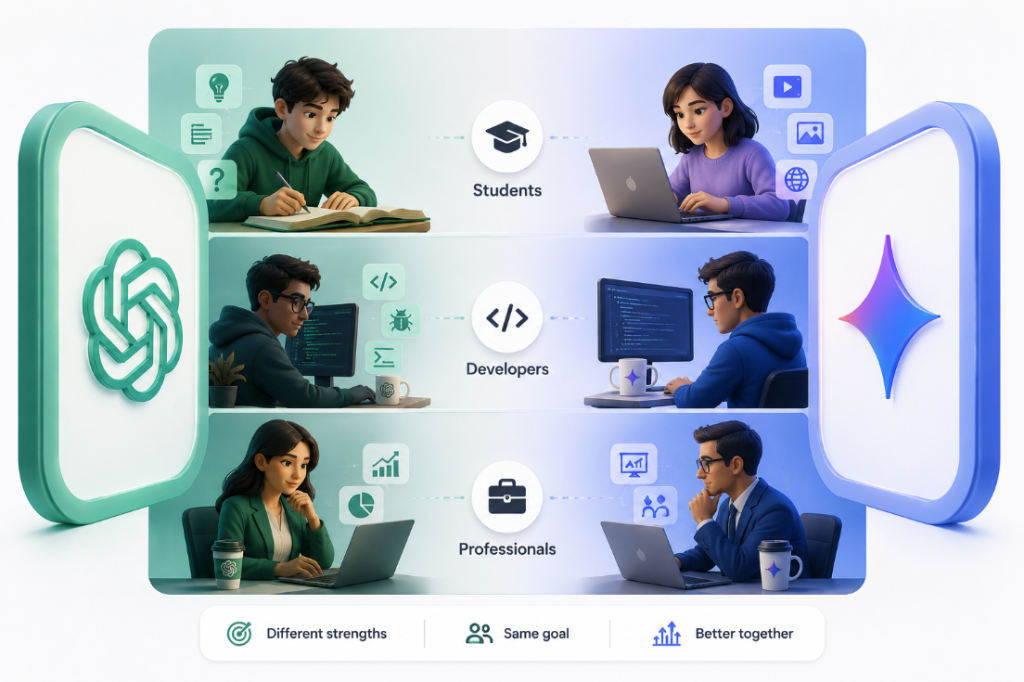
Best for Computer Science Students
Learning advantages: Gemini’s free tier makes it accessible without a credit card or subscription commitment. For students learning their first programming language, both tools provide clear explanations of concepts. ChatGPT explains algorithmic complexity, data structures, and software design patterns in depth. Gemini’s explanations are equally clear but sometimes less comprehensive.
Homework and projects: ChatGPT doesn’t just generate solutions; it walks through problems pedagogically. You can ask it to explain why a particular approach works or why alternative approaches fail. Gemini does this effectively too, though ChatGPT’s depth makes it better for building genuine understanding.
Competitive advantage: Students using ChatGPT for interview preparation benefit from its ability to explain optimal solutions to algorithm problems. ChatGPT discusses time and space complexity, trade-offs, and alternative approaches, preparing students for technical interviews better than Gemini.
Budget reality: For a student with limited funds, Gemini’s free tier is compelling. You get a functional AI coding assistant without paying. ChatGPT’s free tier exists but is rate-limited and less useful for regular coding.
Recommendation: Students serious about development and interview preparation should invest in ChatGPT. Those building foundational skills or working with limited budgets can use Gemini effectively.
Best for Beginner Coders
Interactive learning: Both tools explain error messages clearly. When a beginner’s code fails, either tool can identify the issue and explain it understandably. ChatGPT provides slightly more detailed context about why errors happen and how to prevent similar issues.
Iterative improvement: Beginners benefit from asking tools to improve code step-by-step. ChatGPT’s iterations feel more educational, explaining each improvement. Gemini’s iterations are practical but less pedagogical.
Building first projects: A beginner building their first web scraper, simple game, or CRUD application succeeds with either tool. Gemini’s free tier makes this more accessible. ChatGPT’s superior code generation means fewer iterations and faster progress.
Recommendation: For pure learning, Gemini’s free tier works. For building confidence and faster progress, ChatGPT’s superior code generation justifies the cost.
Best for Professional Developers
Production code demands: Professional developers shipping code to users need reliability. ChatGPT’s superior performance on complex logic, edge case handling, and debugging saves hours across projects. The time savings and fewer production bugs justify the subscription cost.
Code reviews and standards: Professional teams benefit from ChatGPT’s understanding of architectural patterns, security considerations, and performance optimizations. Gemini can participate in code reviews but is less sophisticated about trade-offs.
Specialized requirements: Need help with WebSocket implementations, distributed caching strategies, or microservice communication patterns? ChatGPT provides authoritative guidance. Gemini handles simpler patterns.
Team tooling: ChatGPT Teams plan ($30/month per user) enables shared prompts, conversation history, and better collaboration features than Gemini’s approach.
Recommendation: Professional developers choosing a single tool should choose ChatGPT. The code quality and debugging capabilities directly impact project success and team productivity.
Best for Freelance Developers
Client deliverables: Freelancers need consistently high-quality code because rework costs them money. ChatGPT’s superior code generation and debugging reduces iteration time, improving profit margins.
Multiple programming languages: Freelancers working across Python, JavaScript, Go, and Rust benefit from ChatGPT’s more nuanced understanding of language-specific patterns and idioms.
Quick turnarounds: When clients need fast turnarounds, ChatGPT’s ability to generate working code in fewer iterations becomes economically valuable.
Cost-benefit: At $20/month, ChatGPT costs approximately $240 annually. If it saves even 2-3 hours per project through better code generation, the ROI is substantial.
Recommendation: Freelancers maximize profitability with ChatGPT.
Best for Startup Founding Teams
Speed matters: Startups live on velocity. ChatGPT’s superior code generation and faster debugging means shipping features faster. In competitive markets, this matters.
Technical depth: Early-stage startups need founders who can make informed architecture decisions. ChatGPT’s more sophisticated technical guidance helps startup teams avoid costly architectural mistakes.
Hiring advantage: Startups using better tools like ChatGPT for code generation can compete for talent against more established companies.
Cost scaling: While ChatGPT Teams is $30/month per person, the productivity gains typically exceed the cost for a founding team.
Recommendation: Startup founding teams should use ChatGPT.
Best for Businesses and Technical Teams
Team collaboration: Gemini’s native Google Workspace integration makes it naturally collaborative if your team lives in Google Docs, Sheets, and Drive. ChatGPT requires more manual workflows.
Enterprise adoption: Larger teams benefit from ChatGPT Teams’ shared conversation libraries, allowing teams to build libraries of useful prompts.
Workflow integration: If your business heavily uses Google services, Gemini integrates seamlessly. If your business uses Slack, Notion, and VS Code, ChatGPT integrates more naturally.
Cost at scale: For teams of 10+, ChatGPT Teams becomes expensive. Gemini’s Workspace pricing may be more economical, especially if you already pay for Google Workspace.
Recommendation: Teams in Google ecosystems should choose Gemini. Teams in modern development tools should choose ChatGPT.
Best For Summary Table
| User Type | Best Choice | Rationale |
| Students learning to code | Gemini (Free) | Cost-free access, strong fundamentals |
| Students serious about interviews | ChatGPT | Deeper explanations and interview prep |
| Beginners with budget | Gemini | Free tier sufficient, lower barrier |
| Professional developers | ChatGPT | Superior code quality and debugging |
| Freelancers | ChatGPT | Reduces iteration time, improves margins |
| Startup founding teams | ChatGPT | Speed and technical depth matter |
| Enterprise teams (Google ecosystem) | Gemini | Native workspace integration |
| Enterprise teams (non-Google) | ChatGPT | Better tool ecosystem integration |
ChatGPT vs Gemini for Everyday Productivity
The coding comparison tells only half the story. Both tools function as general-purpose AI assistants for daily work beyond development.
Email and Communication
ChatGPT: Drafts professional emails naturally, helps rewrite responses for different tones, and can draft complex messages requiring nuance. Especially useful for sensitive communications where tone matters.
Gemini: Integrates natively with Gmail. You can compose emails directly in Gmail using Gemini assistance. For someone working in Gmail all day, this eliminates context switching. Email drafting quality is comparable to ChatGPT.
Advantage: Gemini for Gmail users (native integration), ChatGPT for those outside Google ecosystem.
Research and Document Summarization
ChatGPT: Processes documents well via uploads and provides thorough summaries. Cannot browse the web directly unless you enable the web browsing feature, which isn’t always reliable.
Gemini: Integrated web access means you can ask Gemini to research topics, find current information, and synthesize findings. Deep Research feature handles complex research queries efficiently. Significantly better for current events, recent data, or finding authoritative sources.
Advantage: Gemini for research, ChatGPT for document processing.
Content Creation
ChatGPT: Writes more engaging, varied content. Better at long-form writing, storytelling, and maintaining voice consistency.
Gemini: Handles content creation competently but sometimes produces more formulaic outputs. Better at working within Google Docs directly.
Advantage: ChatGPT for creative writing, Gemini for rapid drafting in Google Docs.
Spreadsheet and Data Work
ChatGPT: Helps write formulas, understands complex spreadsheet logic, but requires context switching to another app.
Gemini: Integrates with Google Sheets. You can ask Gemini to analyze spreadsheet data, create formulas, or generate reports directly within Sheets. For Google Sheets users, this is transformative.
Advantage: Gemini for Google Sheets users, ChatGPT for Excel users.
Project Planning and Brainstorming
Both tools excel here. ChatGPT might edge ahead for complex strategy work, while Gemini’s web access helps with competitive analysis.
Overall Everyday Advantage: Gemini for those deeply in the Google ecosystem, ChatGPT for everyone else.
ChatGPT vs Gemini for Image Generation
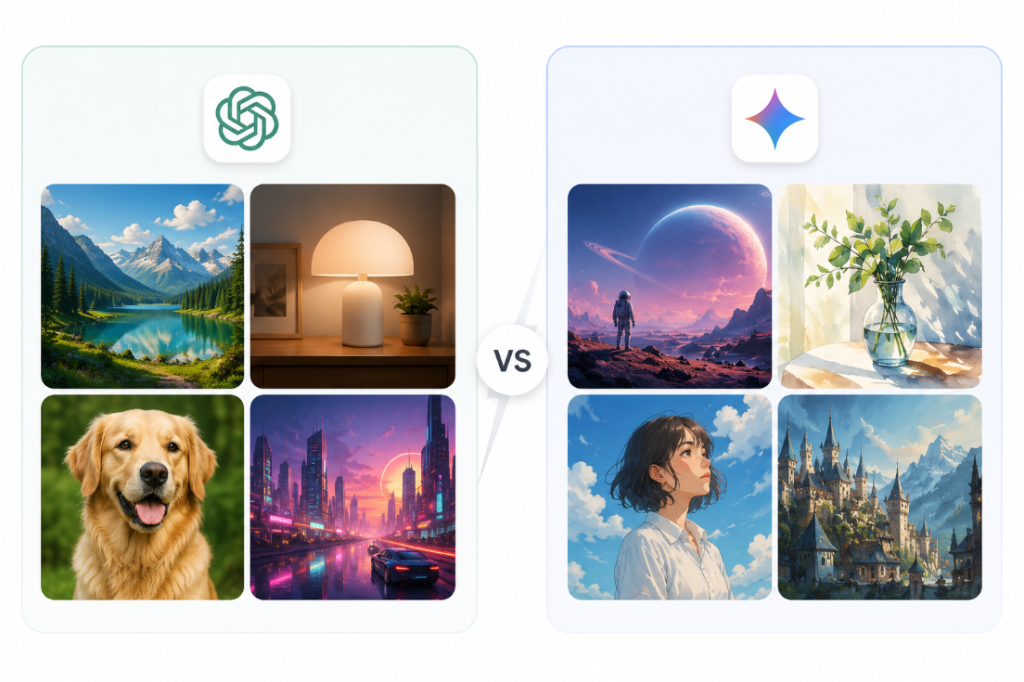
Image generation represents a major differentiator between these tools.
Native Capabilities
ChatGPT: Integrates DALL-E 3, OpenAI’s advanced image generation model. Included in ChatGPT Plus subscription. Can generate 4 images per day on Plus, unlimited with API access.
Gemini: Offers ImageFX and integration with Google’s Imagen 3 model. Included in Gemini Advanced. Provides generous image generation quota on the free plan.
Image Quality and Realism
DALL-E 3 (ChatGPT): Produces photorealistic images when requested, handles complex prompts nuancedly, and respects prompt details precisely. Text rendering inside images is accurate. Excellent for creating marketing materials, product mockups, or concept art.
ImageFX (Gemini): Excels at illustrations, stylized graphics, and digital art. Produces polished results for web graphics and social media. Less consistent with photorealistic requests and text rendering inside images.
Advantage: ChatGPT for photorealistic images and detailed product mockups, Gemini for illustrations and stylized graphics.
Practical Use Cases
Blog featured images: ChatGPT generates cohesive, professional featured images that align with article themes. Works on the first attempt most times.
YouTube thumbnails: Both tools can create thumbnails, but ChatGPT’s text handling makes it better. Text in thumbnails often comes out poorly in Gemini.
UI/UX mockups: ChatGPT’s superior realism and detail make it better for wireframe-to-mockup workflows.
Social media graphics: Gemini’s illustration strength makes it excellent for Instagram, Twitter, and LinkedIn content. Less formal than ChatGPT’s style.
Marketing collateral: ChatGPT wins for professional materials. Product photos, sales pages, and promotional content.
Concept art: Both work, but they suit different aesthetics. ChatGPT for realism, Gemini for stylized interpretations.
Image Editing
ChatGPT: No native image editing capability. You generate an image, then edit it in Photoshop or another tool, or regenerate.
Gemini: Limited in-chat editing capabilities. You can request variations but cannot directly edit existing images.
Advantage: Neither tool has a clear edge. Both require external tools for serious image editing.
Creative Consistency
ChatGPT: Better at maintaining visual consistency across multiple generated images. Useful for creating matching sets of graphics.
Gemini: Sometimes varies considerably between similar prompts, making consistency harder.
Winner for Image Generation: In our testing ChatGPT decisively outperforms Gemini for professional image generation needs. DALL-E 3’s quality, text rendering, and consistency make it the superior choice. Gemini’s ImageFX works well for illustrations and stylized graphics but struggles with realism and detail. For businesses, marketing teams, and anyone creating professional visual content, ChatGPT’s image generation justifies the Plus subscription.
Pricing Comparison: Which Offers Better Value?
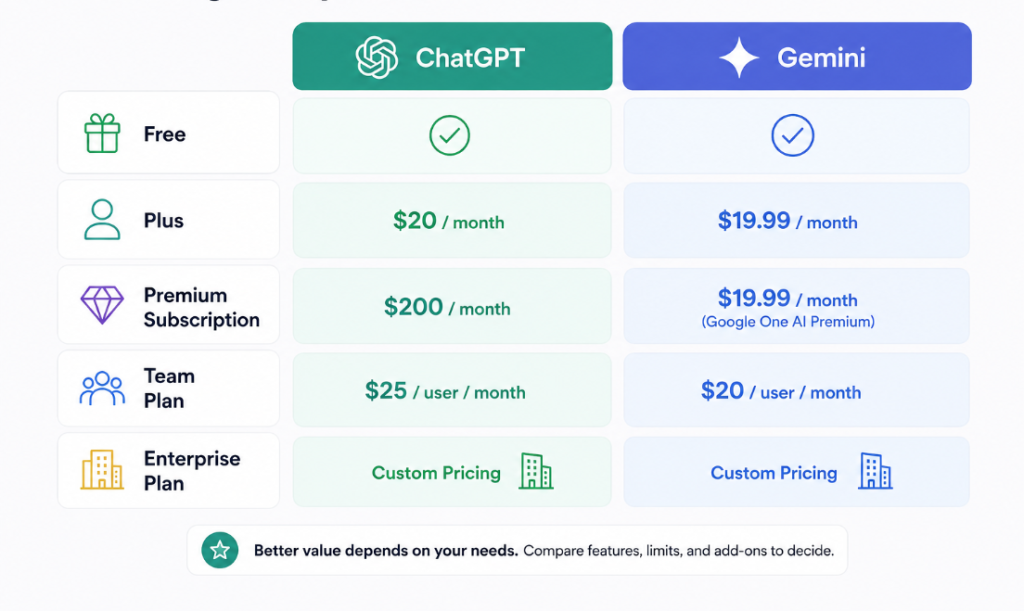
Free Plans
ChatGPT Free:
- Access to GPT-3.5 (older model, slower)
- Limited to 3 messages every 4 hours during peak times
- No DALL-E image generation
- No web browsing
- No plugins
- No file uploads
- Use case: Very limited. Barely functional for coding work.
Gemini Free:
- Access to Gemini 1.5 Flash (newer than ChatGPT Free, faster)
- Generous usage limits (no explicit rate limiting mentioned)
- Limited image generation via ImageFX (monthly quota)
- Web access included
- File uploads included
- Use case: Genuinely functional for learning, light coding, everyday tasks.
Winner: Gemini Free tier dramatically outperforms ChatGPT’s free tier. Not comparable.
Premium Subscriptions
ChatGPT Plus: $20/month
- GPT-4o with extended reasoning
- Advanced DALL-E 3 image generation (4 per day)
- Web browsing integrated
- File uploads (PDFs, images, documents)
- Voice conversation
- Mobile app with advanced features
- Priority support
- Use case: Full-featured for professional developers, students, and everyday users.
Gemini Advanced: $20/month
- Gemini 2.5 Pro model
- ImageFX image generation (generous quota)
- Web search integrated
- File uploads
- Deep Research feature (advanced research tool)
- Native Google Workspace integration
- Mobile app with all features
- Use case: Full-featured for productivity, research, and everyday tasks; better for Google ecosystem users.
Value analysis: Both premium tiers cost identically. ChatGPT Premium excels for developers and image generation. Gemini Advanced excels for research and Google Workspace users.
Team and Enterprise Plans
ChatGPT Teams: $30/month per user
- All Plus features
- Team workspace with shared conversation library
- Admin dashboard
- Usage analytics
- Best for: Small to medium teams needing shared resources
Gemini via Google Workspace:
- Gemini Advanced included in Workspace plans (varies by plan tier)
- Native collaboration across Docs, Sheets, Slides
- Admin controls for enterprise
- Best for: Organizations already using Google Workspace
Cost comparison at scale (10-person team, annual):
- ChatGPT Teams: 10 × $30 × 12 = $3,600/year
- Gemini via Workspace: Varies, but if Workspace is already budgeted, Gemini adds minimal cost
API Pricing (for developers building tools)
ChatGPT API:
- GPT-4o: $5 per 1M input tokens, $15 per 1M output tokens
- GPT-3.5: $0.15 per 1M input, $0.60 per 1M output
- Image generation (DALL-E 3): $0.080 per image (standard)
- Reasonable for production scale
Gemini API:
- Gemini 2.5 Pro: $1.50 per 1M input tokens, $6 per 1M output tokens
- ImageFX integration available
- More economical than ChatGPT for high-volume usage
Winner for API: Gemini offers better pricing at scale, ChatGPT offers more features.
Overall Pricing Verdict
Best value for casual users: Gemini (free tier)
Best value for students and professionals who code: ChatGPT Plus ($20/month)
Best value for Google Workspace users: Gemini (native integration, no add-on cost)
Best value for teams using Google ecosystem: Gemini (lower cost to scale)
Best value for developers building APIs: Gemini (lower token costs)
Best value for mixed professional use: Gemini Advanced + ChatGPT Plus ($40/month for complementary strengths)
Real-World Use Cases and Workflows
Scenario 1: Computer Science Student Learning Data Structures
Problem: Understanding how to implement a binary search tree and optimize for different use cases.
ChatGPT approach: Student asks ChatGPT to explain BST operations. ChatGPT provides a comprehensive explanation of insertion, deletion, and balancing. Generates clean code. When student asks “why is this more efficient than an array?” ChatGPT explains time complexity thoroughly.
Gemini approach: Provides similar explanation and code. Web access allows Gemini to pull up visualizations of BST operations. Deep Research can find recent research papers on BST optimizations.
Best fit: Both work, but ChatGPT’s depth in explaining algorithms gives the student a deeper foundation. Tie with slight ChatGPT edge.
Scenario 2: Freelance Web Developer Building E-commerce Site
Problem: Building a checkout system with payment processing, inventory updates, and order notifications.
ChatGPT approach: Freelancer asks ChatGPT for a full-stack architecture. ChatGPT generates backend code with Stripe integration, handles concurrency when multiple customers order simultaneously, implements idempotent payment processing, and generates React components for the checkout flow. When the freelancer encounters a bug where double-charging occurred under certain conditions, ChatGPT traces through async flows and identifies the race condition.
Gemini approach: Can generate working checkout code. Less confident about race condition debugging. Freelancer needs more back-and-forth iterations.
Best fit: ChatGPT. The complexity of payment processing and concurrent requests makes superior debugging crucial.
Time impact: ChatGPT saves 4-6 hours through better initial code and faster debugging. For a freelancer charging $100/hour, this saves $400-600 per project.
Scenario 3: Startup Founder (Solo Technical Co-founder)
Problem: Building MVP for a SaaS product in 8 weeks. Needs rapid iteration, reliable code, and ability to handle complexity.
ChatGPT approach: Founder uses ChatGPT to architect the application, generate backend endpoints, create frontend components, and debug issues. Higher quality generated code means less refactoring later. Debugging capability reduces time wasted on mysterious bugs.
Gemini approach: Can build the MVP but slower. Iteration cycles take longer due to needing more corrections.
Best fit: ChatGPT. Speed and quality directly impact time-to-market.
Impact: 2-3 week time savings could mean hitting the market before competitors or securing early customers faster.
Scenario 4: Content Creator and Hobby Coder
Problem: Building a side project web scraper to gather data for content analysis, plus creating promotional graphics for content.
ChatGPT approach: Writes web scraper code quickly. Generates attractive promotional graphics with DALL-E for blog posts and social media.
Gemini approach: Web scraper code works but less elegant. Image generation produces stylized graphics but struggles with text and photorealism.
Best fit: ChatGPT for the combination. Gemini works if image generation is stylized rather than photorealistic.
Scenario 5: Small Development Team (3-5 developers)
Problem: Team building B2B SaaS platform. Needs consistency across code, knowledge sharing, and faster development cycles.
ChatGPT approach: Team uses ChatGPT Plus individually. Developers create shared prompts document. Senior developer reviews AI-generated code before merging. This enforces quality standards.
Gemini approach: Team uses Gemini Advanced with Google Docs for shared prompts. Natural integration with documentation but slightly lower code quality.
Best fit: ChatGPT Teams ($30/month per developer) provides shared conversation history, team workspace, and ensures everyone operates from the same library of tested prompts.
Business impact: 15-20% faster sprint velocity through better code generation and knowledge sharing.
Pros and Cons Summary
ChatGPT
Pros:
- Superior code generation for complex logic and full-stack projects
- Best-in-class debugging and problem-solving for tricky bugs
- DALL-E 3 image generation is market-leading
- Excellent for framework-specific guidance (React, Next.js, async patterns)
- Best LLM for technical reasoning and explaining “why” not just “how”
- Widely adopted ecosystem with plugins and integrations
- Strong mobile app with all features
- Default choice for professional developers and teams
Cons:
- Premium tier costs $20/month (not a deal-breaker but a cost)
- Free tier is nearly useless (rate-limited GPT-3.5)
- Less integration with productivity tools compared to Gemini
- Image generation limited to 4 per day on Plus (though API is unlimited)
- No native document workspace collaboration like Google Docs
Gemini
Pros:
- Genuinely useful free tier (no pay required to get started)
- Native integration with Google Workspace (Gmail, Docs, Sheets, Slides, Drive)
- Larger context window (1M tokens handles massive documents)
- Superior for research with integrated web access and Deep Research
- ImageFX for illustrations and stylized graphics
- Better value for teams already using Google Workspace
- More economical API pricing at scale
- Android mobile app particularly strong
Cons:
- Code generation less consistent for complex, non-standard scenarios
- Debugging less sophisticated for tricky bugs
- Image generation less photorealistic and struggles with text
- Some developers find it less “native” to development workflows
- Smaller ecosystem compared to ChatGPT adoption
- Framework-specific guidance not as comprehensive
Limitations and Critical Considerations
Hallucinations and False Confidence
Both ChatGPT and Gemini generate confident-sounding responses that are sometimes entirely incorrect. ChatGPT might claim a library supports a feature it doesn’t. Gemini might suggest a JavaScript method that doesn’t exist. The dangerous part: they sound authoritative. You might spend 30 minutes debugging a “bug” that’s actually invalid code suggested by the AI.
Mitigation: Always test. Check documentation. Use web search to verify claims about libraries you’re unfamiliar with.
Outdated Information
Training data has a cutoff date. ChatGPT’s knowledge extends to April 2024 (for GPT-4o), and Gemini’s extends to early 2024. This means recently released features or libraries don’t exist in their training data. A new version of a popular framework might have breaking changes that the AI doesn’t know about.
Mitigation: Specify versions explicitly. Ask for implementation in “React 18.2.0” not just “React.” Use web browsing to verify current documentation.
Incorrect Dependency Versions
AI recommends syntax or features from library versions your project doesn’t use. You then spend time installing different versions or rewriting code. This happens frequently with Python libraries (NumPy, Pandas, TensorFlow), where syntax changes between major versions.
Mitigation: Specify exact versions in your prompts. “I’m using Python 3.10 and FastAPI 0.95.0.”
Security Vulnerabilities
AI might generate code with security issues:
- Hardcoded secrets
- SQL injection vulnerabilities
- Insecure authentication implementations
- No input validation
ChatGPT is generally better about security than Gemini, but neither is perfect.
Mitigation: Have security-conscious team members review AI-generated code. Never trust authentication code without review. Validate all user inputs.
Licensing and Proprietary Code Risks
Never paste proprietary code into ChatGPT’s web interface if your company has confidentiality requirements. The code becomes part of OpenAI’s training data. Use ChatGPT’s enterprise plan if you need confidentiality guarantees. Similar caution applies to Gemini for sensitive code.
Mitigation: Use API-based access for proprietary code (more private). Ask your legal team about acceptable use.
Overreliance and Skill Atrophy
Developers who use AI for everything without thinking sometimes find their fundamentals weaken. They lose practice at debugging, designing architectures, and understanding why code works.
Mitigation: Continue learning. Don’t use AI for basic tasks while learning fundamentals. Use it to accelerate known workflows, not to replace learning.
API Cost Surprises
If you build an application using AI APIs, costs can spiral. Chatting with ChatGPT API at scale is expensive. A popular application using GPT-4 calls might cost hundreds per day in API fees.
Mitigation: Monitor API usage closely. Use cheaper models (GPT-3.5) for non-critical tasks. Implement rate limiting.
Context Window Limitations
ChatGPT’s 128K token context window seems large until you’re working with a 50K-line legacy codebase. You can’t paste the entire codebase into a single conversation. You have to break it into pieces.
Mitigation: Paste the most relevant code sections. Summarize architecture in text. Ask focused questions rather than uploading everything.
Final Verdict: Which AI Should You Choose?
The answer depends fundamentally on who you are and what you’re building.
Choose ChatGPT if:
- You’re shipping production code where quality matters
- You’re learning to code seriously (for interviews, careers, or deep skill development)
- You need professional image generation (marketing, product mockups, illustrations)
- You’re a freelancer or professional developer where code quality directly impacts income
- You’re building complex applications with non-standard requirements
- You value superior debugging and problem-solving capabilities
Choose Gemini if:
- You’re learning to code and want to start free
- You work deeply in Google Workspace (Gmail, Docs, Sheets, Slides)
- You need frequent research and current information (web access is integrated)
- You’re building a startup or business heavily integrated with Google services
- You want a generalist AI assistant for everyday productivity beyond coding
- You’re cost-conscious and the free tier meets your needs
Choose Both if:
- You’re a professional developer maximizing productivity
- You’re a startup founding team needing both coding quality and research capabilities
- You want complementary AI tools for different workflows
Best Choice by User Type: Final Table
| User Type | Best Option | Second Choice | Investment |
| Student (learning basics) | Gemini Free | – | $0/month |
| Student (serious about interviews) | ChatGPT Plus | Gemini Free | $20/month |
| Beginner coder | Gemini Free | ChatGPT Plus (upgrade later) | $0-20/month |
| Professional developer | ChatGPT Plus | Add Gemini for research | $20-40/month |
| Freelancer | ChatGPT Plus | – | $20/month |
| Startup founding team | ChatGPT Plus + ChatGPT Teams | Gemini if Google Workspace | $600-1,800/year |
| Small dev team (3-5) | ChatGPT Teams | – | $1,080-1,800/year |
| Enterprise (Google Workspace) | Gemini Advanced | ChatGPT Teams for developers | Workspace-dependent |
| Content creator / hobbyist | Gemini Advanced | – | $20/month |
| Researcher / analyst | Gemini Advanced | – | $20/month |
Future Outlook
By late 2026, the gap between these models is narrowing. Both tools are improving rapidly. Gemini’s multimodal capabilities are advancing quickly. ChatGPT maintains an edge in reasoning and code generation, but this gap may close. The tools are converging toward feature parity, making the choice increasingly about ecosystem integration and personal workflow fit rather than raw capability.
For developers, the competitive pressure on OpenAI and Google to improve coding capabilities means both tools will continue advancing. The wise strategy: choose based on current needs, but remain flexible. Your choice this month might not be optimal in six months as these tools evolve.
Frequently Asked Questions
1. Is Gemini better than ChatGPT for coding?
No. ChatGPT generates higher-quality code for complex scenarios, debugs more effectively, and understands advanced patterns better. Gemini is sufficient for learning and straightforward coding but lacks ChatGPT’s sophistication. For production code, ChatGPT is the safer choice.
2. Which AI writes better code for Python in 2026?
ChatGPT writes more reliable Python for complex projects. For data science with Pandas/NumPy, both are competent. For async Python or complex async operations, ChatGPT is more reliable. For learning Python basics, Gemini works fine.
3. Can Gemini replace GitHub Copilot?
Gemini can work as a coding assistant but isn’t identical to GitHub Copilot. Copilot is integrated into your IDE and understands your project context. Gemini requires context switching. For continuous assistance while coding, Copilot is superior. For writing substantial code blocks, ChatGPT is better.
4. Which AI is best for students learning to code?
Gemini’s free tier makes it accessible. For students serious about interviews or deep understanding, ChatGPT’s superior explanations justify the cost. Most would succeed with Gemini free and upgrade to ChatGPT later.
5. Is Gemini or ChatGPT better for image generation?
ChatGPT (DALL-E 3) is significantly better. Produces photorealistic images, handles text accurately, and respects complex prompts. Gemini (ImageFX) excels at illustrations but struggles with realism and text.
6. Which AI offers better value for money?
Gemini free tier beats all competitors in value. For paid plans at $20/month, it depends on use case. Developers should choose ChatGPT. Google Workspace users should choose Gemini. For mixed use, both at $40/month provides complementary strengths.
7. Can professional developers rely entirely on AI coding assistants?
Partially. AI coding assistants accelerate development dramatically but don’t replace developers. You still need to design architecture, test thoroughly, review code, make architectural trade-off decisions, and understand your system. AI is a powerful tool, not a replacement.
8. Should I use both ChatGPT and Gemini?
For casual users, choose one. For professionals and serious developers, using both strategically (ChatGPT for code, Gemini for research and productivity) costs $40/month but provides measurable productivity gains exceeding the cost.
9. Which AI better understands my existing codebase?
Neither AI has access to your codebase unless you paste it. For integrated IDE assistance, GitHub Copilot understands your codebase. For web interfaces, paste relevant code sections and summarize architecture.
10. What’s the learning curve for using these AI tools effectively?
Minimal for casual use. For professional workflows, learning to write effective prompts takes 1-2 weeks of regular use. Learning when to use which tool takes a few months of experience.