
You already use Notion. Your team’s documentation lives there, your project tracker is there, and now Notion is telling you the AI features you actually want cost $20 per seat per month. Is that number justified?
That question has been debated loudly in 2026 — on Reddit, on G2, and in every Slack channel where someone got the upgrade prompt mid-meeting. Notion made sweeping changes in late 2025 and early 2026: a full rebrand into an “AI-powered workspace,” autonomous agents that run continuously, and a pricing restructure that bundled AI into the Business plan rather than keeping it as a cheap add-on.
This Notion AI review covers exactly what changed, what the features actually do in daily use, how the pricing stacks up against alternatives, and a direct answer to the only question that matters: should your team pay for it?
Quick Summary: What You Need to Know
Best for: Teams already embedded in Notion who want workflow automation, meeting transcription, and AI search without switching tools.
Skip if: You’re a solo user, on a tight budget, or primarily need deep reasoning and research capabilities.
Verdict: 7.5/10 — genuinely powerful within the Notion ecosystem, but the value is tightly conditional on your existing setup.
| What We Evaluated | Quick Answer |
| Core AI features | Strong for workspace-aware tasks |
| Pricing | $20/user/month (Business plan) for full access |
| AI agents | Real and functional, but need precise prompting |
| Meeting notes | One of the best integrated solutions available |
| vs. ChatGPT | Notion wins for workflow; ChatGPT wins for raw intelligence |
| vs. Claude | Claude wins on reasoning depth; Notion wins on workspace context |
| Worth it? | Yes — if your team lives in Notion. No — if you just want a chatbot. |
What Is Notion AI?
Notion AI is the umbrella name for every AI capability inside Notion’s platform. It includes agents, search, writing tools, database automation, image generation, and the standalone Notion Mail inbox. The system runs on a model-agnostic backend — you can switch between GPT-5.2, Claude Opus 4.5, and Gemini 3 depending on the task.
This is important context. Notion AI is not one feature — it’s a suite. And not every piece of that suite carries equal weight. The headline features in 2026 are:
- Notion Agent — a personal AI that executes multi-step tasks autonomously
- Custom Agents — team-wide bots triggered by schedules or workspace events
- AI Meeting Notes — real-time transcription with structured summaries
- Enterprise Search — AI-powered search across your entire connected work stack
- Research Mode — deep-dive synthesis from across your workspace
- AI Writing & Database Tools — the original features: autofill, summarize, draft, translate
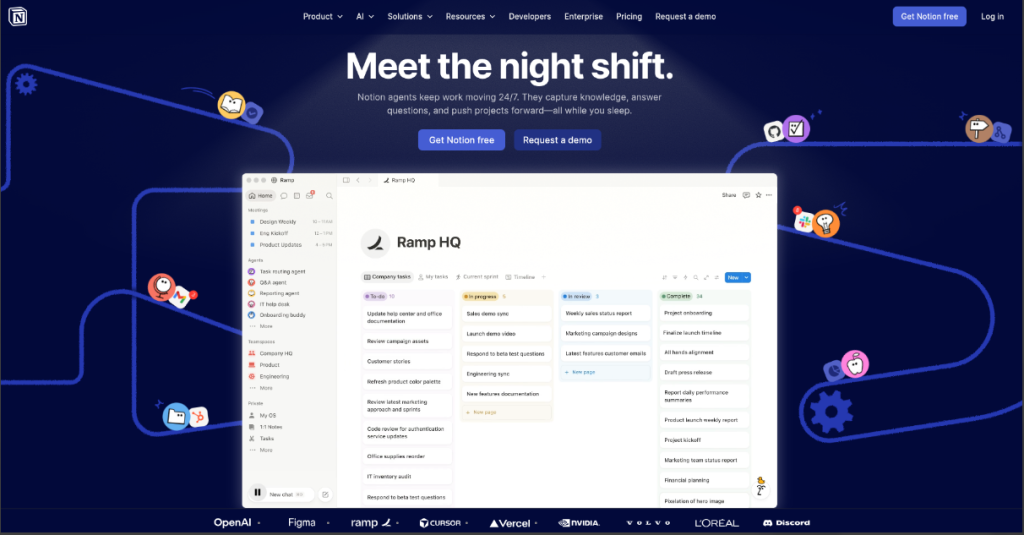
In September 2025, Notion released version 3.0, rebuilt around autonomous agents capable of multi-step work lasting over 20 minutes. By February 2026, they shipped Custom Agents — team-wide bots that run on schedules and triggers. By April 2026, those agents became 35-50% cheaper to run, gained access to private Slack channels, and picked up Salesforce and Box connectors.
That is a lot of movement in a short time. Here is what each major feature actually delivers.
Notion AI Features: The Honest Breakdown
Notion Agent: Your Autonomous AI Teammate
Notion Agent performs complex, multi-step tasks autonomously using your workspace data. It can update project trackers, draft summaries from meeting notes, and complete sequences across hundreds of pages simultaneously, working for up to 20 minutes autonomously.
In practice, users describe the Agent as capable but requiring careful prompting. The consensus framing from user reviews: “a capable intern who knows where everything is but still needs supervision.”
Real-world example: A content team asks the Agent to pull all published articles from the last quarter, check which ones are overdue for an update based on publish date, create a list of those articles in a new database view, and assign each one to the relevant writer. Tasks like this — which used to take a project manager 45 minutes — the Agent handles in under five.
Where it struggles: tasks requiring external reasoning, real-world research, or nuanced judgment. The Agent is only as good as the data already inside Notion.
Custom Agents: Automation That Runs Without You
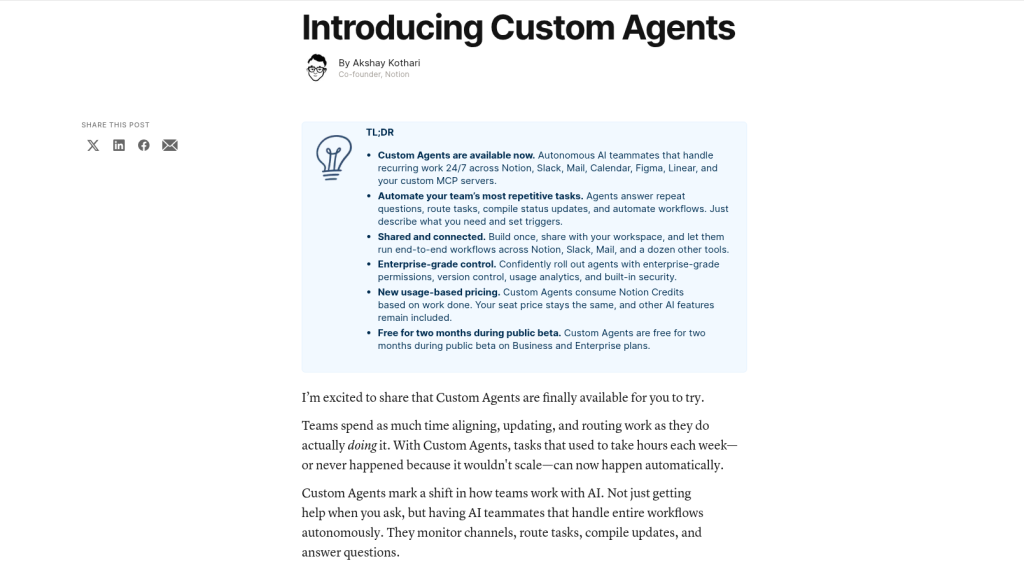
Custom Agents are unlike the personal Notion Agent (which you direct task by task) — they run autonomously on schedules or event-based triggers. They can be shared across teams, have their own model selection, and connect to MCP integrations including Linear, HubSpot, Figma, and Slack.
The most practical use cases teams have built in 2026:
- Daily standup synthesizer: Reads yesterday’s Slack threads in #engineering, summarizes blockers, posts to a Notion page each morning.
- Inbound lead triage: A new row in a “leads” database triggers an agent that researches the company in connected sources, fills in firmographics, and tags priority.
- Meeting follow-up: Watches AI Meeting Notes for new entries, extracts action items, and creates tasks in a project database with assignees.
- Weekly digest: A scheduled agent that pulls “what shipped” from GitHub, “what closed” from Linear, and “what got signed” from Salesforce.
Your existing plan price does not change when using Custom Agents. Notion Agent, AI Meeting Notes, and Enterprise Search remain included in Business and Enterprise plans at no additional cost. Custom Agents themselves moved to a credit-based model in May 2026, priced at $10 per 1,000 Notion Credits.
AI Meeting Notes: The Killer Feature for Most Teams
AI Meeting Notes transcribes meetings in real-time on both desktop and mobile, then generates a summary, extracts action items as a to-do list, and saves everything directly into a Notion page. Since January 2026, mobile transcription runs in the background even when you lock your screen or switch to another app.
The 2026 update added a feature users had been requesting for months: you can now add a quick set of custom instructions, so summaries come out in the format you prefer. A team can define once — “decisions, action items with owners, open questions” — and every future meeting follows that template automatically.
The integration with Notion’s project management layer is where the differentiation is clearest. Meeting summaries live inside the same workspace as your databases, tasks, and docs, so following up on an action item is a matter of tagging the right person in the right database row rather than copying text between apps.
For remote and hybrid teams running more than five meetings per week, this feature alone may justify the Business plan upgrade.
Enterprise Search: Finding Anything, Anywhere
Enterprise Search is Notion’s answer to the “where did that document go?” problem — except it searches beyond Notion itself. It pulls results from connected tools including Slack, Google Drive, GitHub, Jira, Linear, SharePoint, Teams, and more.
When this works, it’s the closest thing on the market to “search my whole work life.” A new hire asking “where’s the onboarding doc?” gets a real answer instead of a six-message Slack chase. The citations matter — you can click through and verify, which is non-negotiable for anything you’d act on.
Two caveats: answer quality scales with how clean the underlying content is, and cross-database joins are still flaky. Connector coverage is broad but not deep — agents read from these tools far better than they write back to them.
AI Writing, Summarization, and Database Tools
These are the original Notion AI features — draft, summarize, translate, autofill, and rewrite. They remain solid and genuinely time-saving for everyday use. Drafting a project brief, summarizing a 50-page document, or translating internal docs for a global team all work well.
What they are not: a replacement for a dedicated AI writing assistant if high-quality long-form content is your primary need.
Notion AI Pricing 2026: What You Actually Pay
This is where most reviews lose accuracy, because Notion’s pricing changed significantly in mid-2025 and again in early 2026.
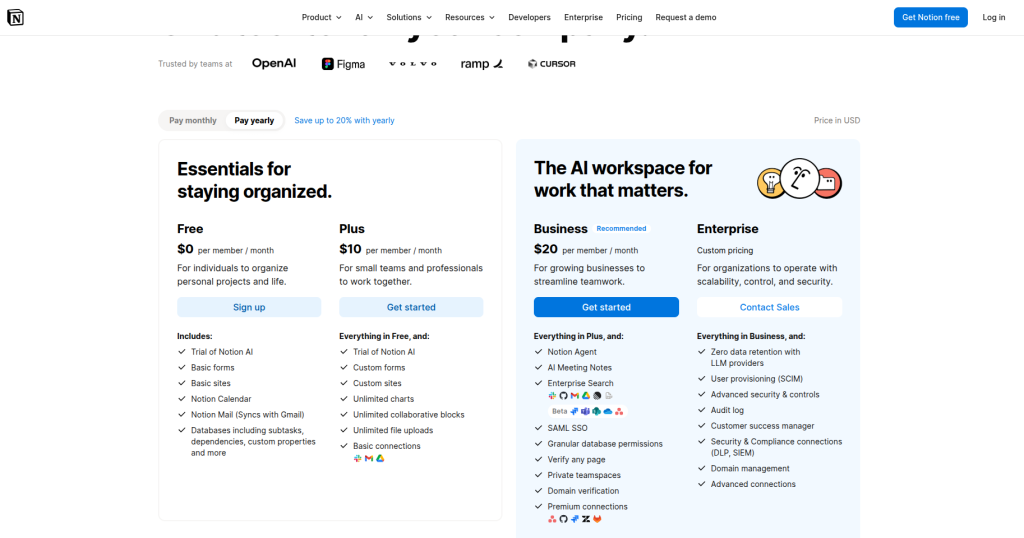
The current pricing model as of May 2026:
- Free — $0/member. Trial-only AI access — a small lifetime quota of complimentary responses, then nothing.
- Plus — $10/member/month. Same trial-only AI access. The plan that frustrates the most users, because the price suggests AI is included and it isn’t beyond the trial.
- Business — $20/member/month. Full Notion AI bundled — Custom Agents, AI Meeting Notes, Enterprise Search, Research Mode, model picker. This is the tier the product is actually designed for.
- Enterprise — Custom pricing.
| Plan | Price (Annual) | AI Access | Key AI Features |
| Free | $0/user/month | Trial only | Limited responses, then stops |
| Plus | $10/user/month | Trial only | Same as Free AI-wise |
| Business | $20/user/month | Full | Agent, Meeting Notes, Enterprise Search, Research Mode, model picker |
| Enterprise | Custom | Full + security | All Business features + HIPAA, SCIM, zero data retention |
| Custom Agents | +$10/1,000 credits | Add-on | Credit-based usage on top of Business/Enterprise |
The critical math for teams: If you were paying $8 for Plus plus $10 for the old AI add-on, you were on $18/seat. The same setup today is $20/seat on Business, with more AI features baked in. For most teams migrating from the legacy plan, the difference is small. For new teams who want AI, Business is the only practical option.
The solo user math: Notion AI at $20/user/month includes access to multiple leading AI models, Notion Agent, AI Meeting Notes, and Enterprise Search. Compare that to managing separate ChatGPT Plus, Claude Pro, and search tools — each at $20/month — and Notion consolidates all of that with workspace context included. For a solo professional already on Notion, that consolidation argument is legitimate.
Notion AI vs. ChatGPT vs. Claude: Which Should You Use?
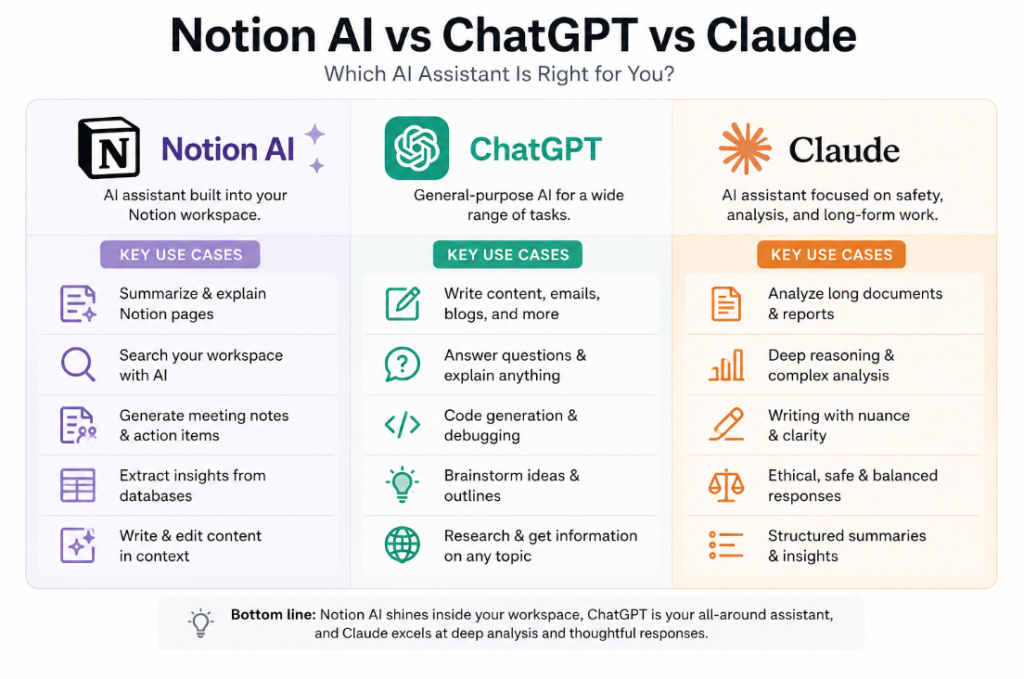
This is one of the most searched questions in 2026, and the honest answer is that they serve different jobs.
| Capability | Notion AI | ChatGPT | Claude |
| Workspace context | Excellent — reads your docs | None — blank slate every chat | None without integration |
| Reasoning depth | Moderate | Strong | Very strong |
| Creative writing | Good | Very good | Excellent |
| Code understanding | Basic | Strong | Strong |
| Meeting transcription | Yes (native) | No | No |
| Task/database automation | Yes (native) | No | No |
| Web browsing | No | Yes | Yes |
| Price | $20/user/month (Business) | $20/month (Plus) | $20/month (Pro) |
Notion AI is best for teams and individuals who already live in Notion — it’s a productivity powerhouse for organizing, summarizing, and writing within your workspace. ChatGPT is the stronger all-purpose AI for research, coding, creative writing, and complex reasoning.
In blind comparison tests, users rated Claude responses 73% higher than Notion AI on reasoning depth and analytical quality, but rated Notion AI 62% higher on contextual relevance to workspace data. That gap explains why many power users run both: Claude or ChatGPT for deep thinking, Notion AI for execution inside their workspace.
The hybrid approach is what many successful implementations use — ChatGPT or Claude for deep work requiring AI excellence, Notion AI for day-to-day workflow automation and collaboration.
Best for: Use Notion AI when the task lives inside your workspace. Use ChatGPT or Claude when the task requires reasoning, research, or creativity beyond your existing documents.
Who Should Use Notion AI: Real-World Use Cases
For Content Teams
A content team of five writers uses Notion as their editorial calendar. With the Business plan, the AI Meeting Notes feature transcribes every editorial review call and auto-generates a list of article assignments, deadlines, and revisions in their content database. The Custom Agent monitors that database and posts a Slack summary every Monday morning with what’s published, what’s in draft, and what’s overdue. What used to require a dedicated project manager is now mostly automated.
For Product and Engineering Teams
AI Meeting Notes now pulls full transcripts and structured summaries via API, so teams can automatically follow up on action items across the tools they already use. A product team connects Notion to Linear for bug tracking and GitHub for releases. A scheduled Custom Agent pulls weekly status from both sources and creates a stakeholder update doc automatically.
For Founders and Solo Operators
Founders and solo operators can use Notion as a “second brain” — capture meeting notes fast, let AI clean them up and extract actions, build and maintain a personal wiki that AI can query and update on your behalf. The Business plan at $20/month is justifiable once you calculate the hours saved on note cleanup and search alone.
For Operations and HR Teams
Operations and HR teams can build and maintain SOPs with AI-assisted writing, auto-translate internal documents for global teams, use agents to route onboarding tasks, and generate weekly summaries of cross-functional project status.
For Beginners
Notion AI has a steep learning curve if you are new to Notion itself. The AI features layer on top of an already complex workspace. New users are better served by spending two to three weeks learning the core Notion structure before turning on AI. The AI only amplifies what is already organized — it does not organize chaos for you.
Best Practices for Getting the Most Out of Notion AI
1. Build a clean workspace first. Answer quality scales with how clean the underlying content is. Messy, inconsistent pages produce inconsistent AI results. Standardize your page structure before relying on the Agent or Enterprise Search.
2. Use custom format instructions in AI Meeting Notes. Set your preferred output format once — decisions, actions, owners, open questions — and every meeting automatically follows that structure. This is the single highest-ROI setup step.
3. Start with one Custom Agent before building a suite. The teams seeing the most value pick one high-friction recurring task — usually the weekly digest or meeting follow-up automation — and automate that first. Trying to automate everything at once leads to credit overuse and confusing results.
4. Use the model picker strategically. You can switch between GPT-5.2, Claude Opus 4.5, and Gemini 3 depending on the task. Use Claude Opus for analytical documents, use faster models for quick summaries and autofill tasks to conserve credits.
5. Connect the right integrations before deploying Enterprise Search. Enterprise Search is only as useful as the tools it can reach. Set up Slack, Google Drive, and GitHub connections before expecting cross-platform search results.
Notion AI Pros and Cons
| Pros | Cons |
| Deeply integrated into your existing workspace | Full AI only on $20/month Business plan |
| AI Meeting Notes is best-in-class for teams | Plus plan offers AI trial only — misleading for new users |
| Custom Agents automate real recurring workflows | Custom Agents now cost credits on top of plan price |
| Multi-model support (GPT-5.2, Claude, Gemini) | Weaker on reasoning vs. standalone AI tools |
| Enterprise Search spans connected tools | Enterprise Search quality depends on data cleanliness |
| Strong collaboration and permission controls | Complex setup curve for new users |
| HIPAA-compliant option at Enterprise tier | Cross-database queries still unreliable |
Limitations to Know Before You Buy
The Plus plan is a trap for new buyers. At $10/month, it sounds like a reasonable entry point. But Plus gets the same limited trial as the free plan. Once you exhaust it, AI features stop responding and the upgrade prompt points you at Business. If you want AI, budget for Business from the start.
The Agent needs supervision. User reports across review platforms consistently describe needing a review pass after Agent-generated outputs. Do not put a Custom Agent in a client-facing workflow without a human checkpoint.
Pricing complexity is real. The standalone $10 add-on was retired in May 2025, and Custom Agents now bill at $10 per 1,000 Notion credits as of May 4, 2026. Credits reset monthly without rollover. For teams running multiple Custom Agents, the credit costs can accumulate quickly without careful monitoring.
Not built for deep reasoning or research. If your primary need is complex analysis, long-form research, or high-quality creative writing, a dedicated Claude Pro or ChatGPT Plus subscription will outperform Notion AI for those tasks.
Data privacy has nuances. Enterprise users can enable zero data retention with LLM providers and HIPAA compliance. Free and Business users should review Notion’s current data usage policies before feeding sensitive organizational data into AI features.
Notion AI Alternatives Worth Considering
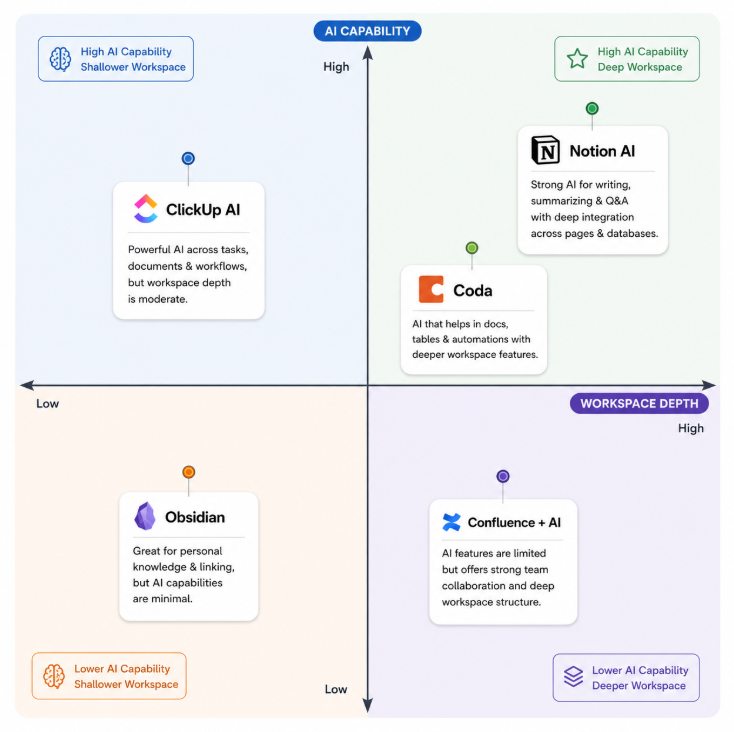
- ClickUp AI ($7-12/user/month): Better for dedicated project management with native Gantt charts, dependencies, workload views, and resource management at lower price points. Less flexible for documentation-heavy teams.
- Coda AI: Strong for document-as-app workflows. More structured than Notion but less flexible.
- Confluence + Atlassian Intelligence: Better for engineering teams already in the Jira ecosystem. Enterprise-grade but expensive and less intuitive.
- Obsidian + AI plugins: Free, privacy-focused, excellent for personal knowledge management. Requires technical setup. No native team collaboration.
- ChatGPT or Claude standalone: Lower cost, better raw reasoning. Zero workspace integration. Right choice if Notion is not already your primary tool.
Final Verdict: Should You Pay for Notion AI in 2026?
Notion AI in 2026 is a genuinely capable AI workspace layer. The autonomous agents work, meeting transcription is among the best in its category, and Enterprise Search solves a real problem for growing teams. The product has moved fast and the current feature set is meaningfully better than it was twelve months ago.
But the value is conditional. Here is the clearest breakdown:
Pay for Notion AI if:
- Your team already uses Notion as its primary workspace
- You run regular team meetings that produce action items
- You have recurring documentation tasks that could be automated
- You are already paying $8-18/seat for Notion + the old AI add-on (the Business plan is a net win)
- You are consolidating multiple tools and want one AI-powered workspace
Skip Notion AI if:
- You are a solo user who primarily needs a writing or research assistant
- Your team is on Plus and rarely uses Notion deeply enough to need AI
- You need powerful reasoning, complex analysis, or research capabilities
- You are not already embedded in the Notion ecosystem
The smartest setup in 2026, based on how teams are actually working: Use Notion Business for workspace management, meeting notes, and automation. Use Claude Pro or ChatGPT Plus for deep reasoning, research, and content creation. The two tools complement each other rather than overlap, and the combined cost of $40/month per power user is justifiable against the hours saved.
Notion AI earns a 7.5 out of 10 in 2026. The ceiling is high if you commit to the ecosystem. The floor is low if you are just looking for a chatbot with a $20/month price tag.
FAQ: Notion AI Review 2026
Is Notion AI free? Notion AI is not free. While Notion offers a free tier for its core productivity tools, it only includes a trial of AI features, such as document generation and database autofill. Full access to Notion AI is available only with a paid subscription — specifically the Business plan at $20/user/month.
What is Notion AI’s pricing in 2026? Notion AI is included in the Business plan at $20/user/month (annual billing) and Enterprise at custom pricing. Free and Plus plans only get a limited trial allocation. Custom Agents started using credits at $10 per 1,000 credits as of May 4, 2026, as an add-on for Business and Enterprise plans.
Is Notion AI worth it for small teams? For small teams (under five people) already using Notion for documentation and project management, the Business plan at $20/seat is often worth it primarily for AI Meeting Notes and the Notion Agent. For teams not already embedded in Notion, standalone AI tools offer better value.
How does Notion AI compare to ChatGPT? Notion AI is best for teams already in Notion — it excels at workflow automation, summarizing notes, and database management. ChatGPT is the stronger all-purpose AI for research, coding, creative writing, and complex reasoning. If you want one tool for everything, choose ChatGPT. If you want AI baked into your project management workflow, Notion AI wins.
Can Notion AI replace ChatGPT or Claude? No. Notion AI has access to your workspace but uses a more constrained reasoning model. Claude Pro and ChatGPT have frontier-level intelligence but zero context about your notes. Most power users run Notion AI alongside a dedicated assistant, not instead of one.
What are Notion Custom Agents? Custom Agents are team-wide bots that run autonomously on schedules or event-based triggers. They can be shared across teams, have their own model selection, and connect to MCP integrations including Linear, HubSpot, Figma, and Slack. They are the most powerful automation feature in Notion’s 2026 lineup, but they now consume credits beyond their initial trial period.
Does Notion AI work for meeting transcription? Yes. AI Meeting Notes transcribes meetings in real-time on desktop and mobile, generates a summary, extracts action items as a to-do list, and saves everything directly into a Notion page. Since January 2026, mobile transcription runs in the background even when you lock your screen.
What AI models does Notion AI use? Notion AI runs on a model-agnostic backend — you can switch between GPT-5.2, Claude Opus 4.5, and Gemini 3 depending on the task. The Business plan includes a model picker so users can choose the right model for each task.
Is Notion AI good for knowledge management? It is strong for workspace-specific knowledge management. Enterprise Search spans connected tools including Slack, Google Drive, and GitHub, making it a practical knowledge hub for teams with content spread across multiple platforms. It is less useful for managing knowledge from sources outside your connected apps.
What happens to the old Notion AI add-on? The standalone Notion AI add-on was retired in May 2025 for new Free and Plus customers. Legacy subscribers keep grandfathered access. Business unlocks the full 2026 AI suite: Notion Agent, AI search, AI Meeting Notes, and Enterprise Search.