
Anthropic’s Claude has quickly become one of the most capable AI programming assistants available today, and developers ranging from weekend hobbyists to senior engineers at large product teams are integrating it into their daily workflow.
What makes Claude stand out for coding is not just its ability to write code. It reasons through problems, asks clarifying questions when a prompt is vague, and explains its decisions in plain language. This guide walks you through everything you need to know about using Claude AI for coding, from basic code generation to advanced debugging, code review, and building full software workflows.
Whether you are working in Python, JavaScript, TypeScript, Go, or any other major language, this guide gives you practical strategies you can start using today.
What Is Claude AI and Why Do Developers Use It?
Claude is a large language model developed by Anthropic, designed with a strong emphasis on safety, reasoning, and helpfulness. For developers, it functions as an AI pair programmer that can handle a wide range of tasks across the software development lifecycle.
The reason developers gravitate toward Claude specifically comes down to a few things. Its context window is massive, meaning you can paste in an entire codebase file or a long error log and Claude will process it without losing track of earlier details. Its explanations are clear and structured, which matters a lot when you are trying to understand why a solution works, not just copy and paste it. And unlike some tools that just autocomplete lines, Claude can engage in multi-turn conversations about your code, refining its output as you provide more context.

How to Access Claude AI for Coding
Before you can start writing code with Claude, you need to pick the right access point for your workflow.
The simplest way is through Claude. ai, Anthropic’s web interface. You get a chat-based environment where you can type prompts, paste code, and have back-and-forth conversations. The free tier gives you access to Claude Sonnet, which is more than capable for most coding tasks. Claude Pro subscribers get priority access to Claude Opus, the most powerful model in the lineup.
For developers who want to integrate Claude directly into their tools, the Claude API is the right choice. You can embed it in your own applications, build internal developer tools, or pipe it into CI/CD workflows. The API uses standard REST calls and the documentation is clean and well-organized.
There are also third-party integrations worth knowing about. Cursor, a popular AI-powered code editor, supports Claude as a backend model. Some VS Code extensions also allow Claude integration. These options let you use Claude inside your existing development environment without switching between windows.
Core Coding Tasks Claude Excels At
Code Generation from Natural Language
This is the entry point for most developers. You describe what you want in plain English and Claude writes the code. But the quality of what you get back depends almost entirely on how well you frame your request.
A vague prompt like “write a login function” will produce something generic. A specific prompt like “write a Python function that authenticates a user using JWT tokens, checks token expiry, and returns a 401 if validation fails” gives Claude enough context to produce something production-relevant.
The best prompts for Claude coding tasks follow a simple pattern: language, purpose, constraints, and expected output. When you include all four, the output jumps significantly in quality.
Example prompt:
“Write a JavaScript function using Node.js and Express that handles file uploads, validates file type to only allow PNG and JPEG, enforces a 5MB size limit, and returns a JSON response with the file URL on success or an error message on failure.”
That level of specificity produces code you can actually use with minimal editing.
Debugging and Error Analysis
Paste your error message, paste your code, and ask Claude what is wrong. This is one of the most underrated use cases. Claude does not just identify the error line. It explains what caused the error, why it happened, and what the fix looks like in context.
For Python developers dealing with stack traces, this is especially useful. Claude reads the full traceback, identifies the root cause (not just the surface symptom), and often catches secondary issues that could have caused the next bug.
A strong debugging prompt looks like this: “Here is my Python code and the error I am getting. Identify what is causing the AttributeError on line 34, explain why it occurs, and give me the corrected version.”
Code Review and Refactoring
If you have working code that you know could be cleaner, Claude handles refactoring requests well. Ask it to review a function for readability, reduce complexity, or align with a specific pattern like SOLID principles, and it will return annotated suggestions or a rewritten version with explanations.
This is particularly valuable for developers working alone who do not have a team for peer review. Claude gives you a second opinion on your code structure, naming conventions, and logical flow. It will flag things like deeply nested conditions, unclear variable names, or functions that are trying to do too much at once.
Writing Unit Tests
Test coverage is one of those things developers know matters but often skip when under deadline pressure. Claude makes this easier. Paste in a function and ask it to write unit tests using your preferred testing framework, whether that is best for JavaScript, pytest for Python, or JUnit for Java.
What Claude does well here is generating edge case tests, not just happy path scenarios. Ask it explicitly: “Write unit tests for this function, including edge cases for empty inputs, invalid types, and boundary values.” You will get a more comprehensive test suite than most developers write manually under time pressure.
Code Documentation Generation
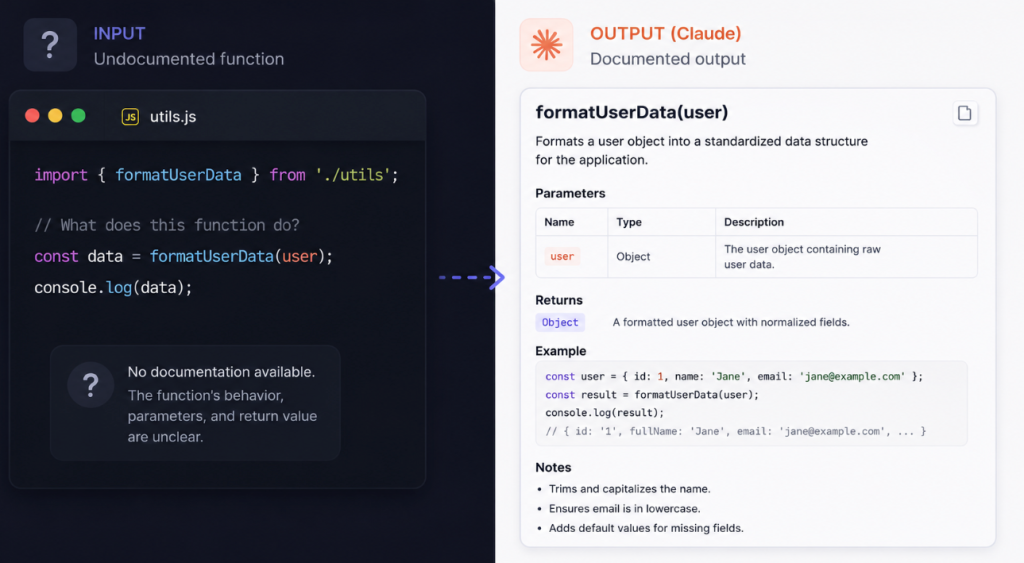
Writing inline comments and documentation is tedious but necessary. Claude can take an undocumented function or class and return a fully documented version with docstrings, parameter descriptions, return value explanations, and usage examples. For teams maintaining large codebases, this is a significant time saver.
Claude AI for Specific Languages and Frameworks
Python
Claude performs exceptionally well with Python. It handles everything from data science workflows with pandas and NumPy to backend API development with FastAPI or Django. For Python specifically, Claude is strong at explaining idiomatic approaches, helping you write more Pythonic code rather than just translating logic from another language.
JavaScript and TypeScript
Frontend and backend JavaScript development both work well with Claude. React component generation, async function handling, TypeScript type definitions, and Node.js API logic are all areas where Claude delivers reliable, usable output. TypeScript users in particular benefit from Claude’s ability to reason about type hierarchies and generics.
Other Languages
Claude supports all major languages including Go, Rust, Java, C++, PHP, Ruby, and Swift. The depth of performance varies somewhat by language. For languages with smaller training corpora, you may need to be more explicit in your prompts and verify output more carefully.
Claude vs ChatGPT for Coding: A Quick Comparison
| Feature | Claude (Sonnet/Opus) | ChatGPT (GPT-4o) |
| Context window | Up to 200K tokens | Up to 128K tokens |
| Code explanation quality | Very detailed and clear | Good but sometimes surface-level |
| Debugging accuracy | Strong with full context | Strong but may miss root causes |
| Long file handling | Excellent | Good |
| API availability | Yes | Yes |
| Free tier | Yes (Claude Sonnet) | Yes (GPT-4o with limits) |
| IDE integration | Via Cursor, extensions | Via Copilot, extensions |
Both tools are strong, and many professional developers use them together. Claude tends to outperform in tasks requiring deep reasoning about large codebases, while ChatGPT benefits from a broader plugin and tool ecosystem.
Explore: the best AI tools for students here
Practical Workflow: Using Claude AI in Your Development Process
Here is how a typical developer workflow looks when Claude is integrated properly.
You start your morning by reviewing the feature you need to build. Instead of opening Stack Overflow, you open Claude and describe the feature at a high level, asking for an architectural overview first. Claude helps you think through the component structure, data flow, and edge cases before you write a single line of code.
Then you move into implementation. You write prompts for specific functions, paste Claude’s output into your editor, and run your tests. When something breaks, you paste the error back into Claude with the relevant code and get a targeted fix.
At the end of a coding session, you paste the functions you wrote and ask Claude to review them for anything you might have missed. You ask it to generate tests for the new logic. If you are writing an API, you ask it to generate documentation in OpenAPI format.
This loop, plan, build, debug, review, document, turns Claude into something closer to a development collaborator than a code generator.
Best Practices for Coding with Claude
The single most important practice is specificity. Vague prompts produce generic output. The more context you give about your language, framework, use case, and constraints, the better the output.
Always review Claude’s code before running it in production. Claude can produce code that looks correct but contains subtle logic errors, especially in security-sensitive areas like authentication, data validation, or file handling. Treat Claude’s output the way you would treat code from a junior developer: capable and useful, but requiring review.
Use multi-turn conversations rather than expecting a perfect answer on the first prompt. If Claude’s first output is not quite right, tell it what needs to change. “The logic is correct but I need this to handle async errors properly. Update the function to use try/catch inside the async block.” Iteration produces much better results than starting over.
When asking Claude to debug, always include both the error message and the full relevant code. Half the context produces half the answer.
For team environments, establish prompt conventions so everyone is getting consistent quality output. Standardizing how your team asks Claude for code reviews or test generation reduces variability and improves reliability.
Limitations to Keep in Mind
Claude does not have real-time access to the internet, which means it cannot pull in the latest version of a library or check live documentation. If you are working with a library that has changed significantly in recent versions, verify the output against current docs.
Claude can hallucinate API methods or library functions that do not exist. This happens more often with niche libraries than with major frameworks, but it is something to watch for. Always run the code, do not just read it.
Complex multi-file architectures can be challenging because Claude works within a single context window. It cannot automatically know about files you have not shared. When working on large projects, you need to be deliberate about what context you paste in.
Finally, Claude is not a substitute for understanding your code. Using it to generate code you do not understand creates a technical debt problem that compounds over time. The best use of Claude is as a tool that accelerates your thinking, not one that replaces it.
Conclusion
Claude AI is one of the most capable coding tools available right now, and the developers getting the most out of it are the ones who treat it as a thinking partner rather than a code generator. It handles generation, debugging, refactoring, testing, and documentation across all major languages, and its large context window makes it genuinely useful for complex, real-world codebases.
The practical steps are simple: get access through Claude.ai or the API, build specificity into your prompts, iterate in multi-turn conversations, and always review the output before deploying. Whether you are building a solo project or working in a team environment, integrating Claude into your development workflow will meaningfully reduce the time you spend on routine coding tasks and give you more space to focus on the work that actually requires your full attention.
For developers who have not tried it yet, the entry point is a free account at Claude.ai. Run a real problem through it today, not a toy example, and see what it produces.
Frequently Asked Questions
What is Claude AI best used for in coding?
Claude AI is best used for code generation, debugging, refactoring, unit test writing, and documentation. It performs particularly well on tasks that require detailed reasoning, such as identifying the root cause of a bug or explaining complex logic.
Is Claude AI good for beginners learning to code?
Yes. Claude explains its code in plain language, which makes it useful for beginners who want to understand what a function does and why it is written a certain way. It is a strong learning tool when used to understand, not just copy.
How is Claude different from GitHub Copilot for coding?
Copilot integrates directly into your IDE and provides inline autocomplete suggestions. Claude works better as a conversational assistant for longer tasks like code review, architecture planning, debugging full error logs, and generating complete functions with explanation.
Can Claude AI write full applications?
Claude can help you build applications component by component, but it does not generate an entire production application in one prompt. It works best when you break down tasks into specific, manageable requests and build iteratively.
What programming languages does Claude support?
Claude supports all major programming languages including Python, JavaScript, TypeScript, Java, C++, Go, Rust, Ruby, PHP, and Swift, among others.
Is Claude AI free for coding?
Yes. Claude.ai has a free tier that gives access to Claude Sonnet, which is capable enough for most coding tasks. Claude Pro unlocks higher usage limits and access to Claude Opus.
How do I write good prompts for Claude’s coding tasks?
Include the language, framework, specific task, constraints, and expected output in your prompt. The more context you provide, the better the output. Avoid vague requests like “write a login function” and instead describe exactly what the function needs to do.
Can Claude AI help with code reviews?
Yes. You can paste your code and ask Claude to review it for readability, performance, security issues, or adherence to specific patterns. It gives structured feedback similar to what you would get from a peer review.
Does Claude AI make mistakes in code?
Yes. Claude can produce incorrect code, especially for edge cases, niche libraries, or complex logic. Always review and test the output before deploying to production.
What is the best way to use Claude for debugging?
Paste both the error message and the relevant code into Claude. Ask it to identify the root cause, explain why the error occurs, and provide a corrected version. Providing full context produces much more accurate results.