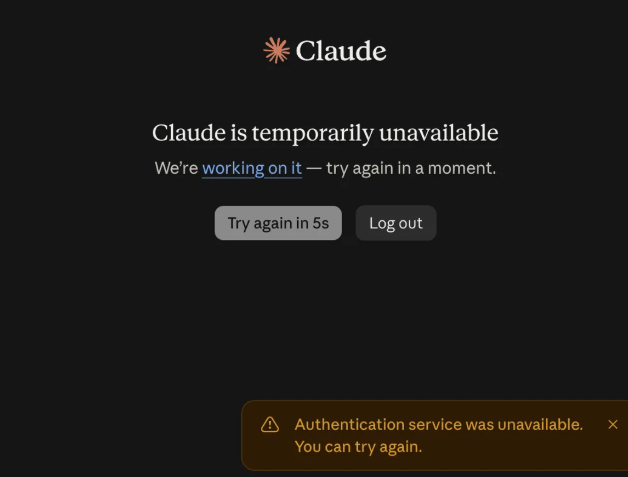
If you’re seeing an “Authentication Service Unavailable” error when trying to log into Claude or Claude Code, you’re not alone. This error can make you wonder whether your password is wrong, your account is suspended, or Claude itself is having problems. The reality is more nuanced: authentication errors can stem from Claude’s backend infrastructure being down, or they can be caused by your browser, network, or account session.
This article explains what the error means, how to determine whether Claude is experiencing an outage, and what troubleshooting steps actually work for local issues.
Quick Answer: Understanding the Authentication Service Unavailable Error
What does “Claude Authentication Service Unavailable” mean?
This error occurs when Claude cannot verify your login credentials or session. It may indicate that Claude’s authentication servers are temporarily unavailable, your browser session has expired, or your network is blocking authentication requests.
Is it usually my account’s fault?
No. This error alone does not indicate a problem with your password, subscription, or account status. It often signals a server-side issue or a local connectivity problem.
How do I check if Claude is down?
Visit Anthropic’s official status page at status.anthropic.com or status.claude.com. This page reports real-time incidents affecting Claude.ai, Claude Code, Claude Cowork, and the Claude API.
What should I do during a confirmed outage?
Wait for Anthropic to resolve the issue. Avoid changing your password, reinstalling software, or modifying settings. Monitor the status page for recovery updates.
What should I try if Claude is operational?
Clear your browser cookies, try private browsing mode, test on another network or device, and temporarily disable VPN or proxy software.
What Does “Authentication Service Unavailable” Mean on Claude?
Authentication is the process Claude uses to verify your identity and confirm that you have permission to access the service. When you log into Claude.ai or authenticate Claude Code, you’re asking Claude’s servers to check whether your credentials are valid and whether your session is active.
An “Authentication Service Unavailable” error means Claude cannot complete this verification process. This can happen for several reasons, ranging from Claude’s infrastructure being down to your browser storing outdated session information.
What Claude Authentication Does
Claude authentication handles multiple tasks:
- Verifying your email or account credentials when you log in
- Maintaining your active session across multiple requests
- Checking whether your Claude Pro subscription is valid
- For Claude Code, authenticating your OAuth connection or API key
- Confirming that your request is coming from an authorized user or application
When any part of this process fails, users may see authentication errors, login failures, or messages indicating the service is unavailable.
Why Claude Shows This Error
Several factors can cause Claude to display an authentication service unavailable error:
- Claude’s authentication infrastructure is temporarily unavailable. When Anthropic’s backend services experience an outage, login attempts fail system-wide. This typically affects many users simultaneously.
- Temporary server-side authentication failure. A brief interruption in Claude’s authentication servers can prevent login even when other Claude services are partially operational.
- Your browser session has expired or become invalid. If you’ve been logged into Claude for an extended period, your session token may have expired, requiring reauthentication.
- Stored cookies or cached authentication data are outdated. Browsers cache session information locally. If this cached data becomes stale, your browser may attempt to use expired tokens.
- A VPN, proxy, firewall, or DNS issue is interfering with authentication requests. Network-level filtering can block authentication requests even when Claude’s servers are operational.
- Network connectivity issues are preventing your device from reaching Claude’s authentication servers. Intermittent internet problems can disrupt the authentication handshake.
Whether you’re experiencing a widespread outage or an individual problem depends on whether other users are reporting the same issue.
Is Claude Down or Is the Authentication Error Only Affecting You?
This is the most important question to answer first. Determining whether Claude is experiencing a service outage or you’re facing a local problem will save you from unnecessary troubleshooting steps.
Check the Claude Status Page
Anthropic maintains an official status page at status.anthropic.com (or status.claude.com). This page provides real-time updates on the health of all Claude services.
When you visit the status page, look for:
- Overall status indicator. A green status means all services are operational. Red or yellow indicates an active incident or degraded performance.
- Individual service status. The page lists specific services including claude.ai, Claude Code, Claude Cowork, Claude Console (platform.claude.com), and the Claude API.
- Active incidents. If an incident is listed, it will show the start time, affected services, and current status.
- Impact level. Anthropic labels incidents as investigating, identified, monitoring, or resolved.
If the status page shows an active incident affecting Claude.ai or Claude Code authentication, Claude is down and you need to wait for Anthropic to resolve it.
Check Third-Party Outage Reports
Websites like Downdetector, StatusGator, and IsDown track user reports of Claude outages. These sites can provide supporting evidence of a broader service problem.
However, these third-party reports should not be treated as the authoritative source. Anthropic’s official status page is the primary reference. Community-reported outages can include false positives or issues that are already resolved.
Check Community Reports and Reddit
When Claude experiences a widespread authentication outage, users typically post reports across Reddit communities like r/claude, r/ClaudeCode, and r/Anthropic within minutes of the incident starting.
A sudden spike in user reports from different geographic regions and different devices (desktop, mobile, CLI) strongly suggests a broader service problem rather than an individual account issue. Community reports are useful supporting evidence but should not replace checking the official status page.
Try Claude on Another Device or Network
Attempting to access Claude from a different device or network can help isolate the problem.
If Claude fails across multiple devices and networks while other users report the same authentication error, a broader service issue is more likely. If Claude works on another device or network but fails on one specific setup, the problem is likely local to that device or network.
Why Is Claude Showing the Authentication Service Unavailable Error?
Claude Is Experiencing a Service Outage
When Claude’s authentication infrastructure experiences an outage, users cannot sign in even if their credentials are correct. During an outage on August 16, 2026, authentication service failures prevented users from logging into Claude.ai, Claude Code, and Claude Cowork from approximately 21:58 UTC until services recovered around 22:34 UTC.
During the August 16 incident, Anthropic first reported an issue preventing some users from authenticating to Claude.ai, Claude Code, and Claude Cowork, followed by reports of degraded performance on Claude.ai and platform.claude.com. The disruption lasted approximately 36 minutes, with Anthropic deploying a fix by 22:22 UTC and marking all services resolved by 22:34 UTC.
During an outage, users can experience problems signing in, Claude failing to load, requests not completing, or other errors when using the affected services.
Temporary Server-Side Authentication Failure
A brief interruption in Claude’s authentication servers can cause login failures without affecting all other Claude services. This is different from a complete outage. For example, the Claude API or Claude Cowork might remain operational while authentication specifically is degraded.
During temporary authentication failures, waiting a few minutes and retrying often resolves the problem as Anthropic’s systems recover.
Your Login Session Has Expired or Become Invalid
Sessions have expiration times. If you have been logged into Claude for several days without logging out, your session token may have expired. When you attempt to use Claude, the service may reject your expired token and return an authentication unavailable error.
Logging out and logging back in with fresh credentials can resolve session-related authentication failures.
Browser Cookies or Cached Data
Your browser stores session tokens and authentication data as cookies. If these cookies contain outdated or incorrect information, your browser may send invalid authentication tokens to Claude’s servers.
Claude’s servers reject the invalid token, and your browser displays an authentication error. Clearing cookies and cached data can resolve this type of problem.
VPN, Proxy, DNS, or Network Problems
Network configuration can interfere with authentication in several ways:
- A proxy server or firewall between your device and Claude’s servers may block authentication requests.
- DNS issues can prevent your device from reaching Claude’s authentication servers at all.
- Some VPNs can interfere with SSL/TLS handshakes that are part of the authentication process.
- Network instability can interrupt the authentication handshake mid-process.
Testing authentication without a VPN or proxy can help determine whether network configuration is contributing to the problem.
How to Fix the Claude “Authentication Service Unavailable” Error
Before attempting troubleshooting, check whether Claude is experiencing a confirmed outage. If Anthropic’s status page shows an active incident, troubleshooting local settings likely will not fix the problem. Focus instead on monitoring official status updates.
If the status page shows all systems operational, proceed with these troubleshooting steps in order.
1. Check Whether Claude Is Down
Visit the official Anthropic status page at status.anthropic.com or status.claude.com. Look for any active incidents labeled as “Investigating,” “Identified,” or “Monitoring.”
If an active incident is listed:
- Note the start time and which services are affected
- Check the latest update for estimated recovery time or current progress
- Wait for Anthropic to post a resolution update
If the status page shows all systems operational but Claude still is not working, continue with the remaining troubleshooting steps.
2. Wait and Try Again
If an active incident is listed on the status page, the fastest resolution usually comes from waiting for Anthropic’s engineering team to implement a fix.
Do not repeatedly attempt to log in during a confirmed outage. This can sometimes delay recovery or complicate diagnostics. Instead, wait 5 to 10 minutes and check the status page again.
During the August 16, 2026 incident, services were restored within 36 minutes of the initial report. Most Claude outages resolve within this timeframe, but some may take longer.
3. Refresh Claude and Retry the Login
Close the Claude.ai tab or window completely and reload the page in your browser. This forces your browser to fetch the latest page code from Claude’s servers rather than using cached code.
After refreshing, attempt to log in again. This simple step can resolve authentication problems caused by outdated cached page data.
4. Try an Incognito or Private Browser Window
Open a new incognito or private browsing window in your browser. Incognito mode does not use your stored browser cookies or cached authentication data.
Attempt to log into Claude in the incognito window. If login works in incognito mode, the problem is related to your stored cookies or cached data in your regular browser.
5. Clear Claude Cookies and Cached Data
If incognito mode works but regular browsing does not, your stored cookies or cached data are likely the issue.
To clear cookies and cached data for Claude:
- Open your browser’s settings or preferences
- Navigate to Privacy, Security, or History settings (the exact location varies by browser)
- Select “Clear browsing data” or “Clear cache”
- Set the time range to “All time” to remove all stored data
- Make sure cookies and cached images/files are selected
- Confirm and clear the data
Close all Claude tabs and log in again.
6. Temporarily Disable a VPN or Proxy
If you use a VPN or proxy software, temporarily disable it and attempt to log into Claude.
VPN and proxy software can sometimes interfere with authentication requests, especially if they are filtering HTTPS traffic or using aggressive encryption. If Claude login works without your VPN or proxy, you may need to configure your VPN to exclude Claude.ai or whitelist Anthropic’s authentication servers.
7. Try Another Network
Attempt to log into Claude using a different network connection. If you normally use your home Wi-Fi, try a mobile hotspot. If you normally use mobile data, try another Wi-Fi network.
This test isolates whether the problem is specific to your current network or applies across all connections.
If Claude works on another network but fails on your primary network, the problem may be related to your router, ISP, network administrator settings, or firewall configuration.
8. Try Another Browser or Device
Open Claude.ai in a different web browser (Safari instead of Chrome, Firefox instead of Edge, etc.) or on a different device (phone instead of laptop, tablet instead of desktop).
If authentication works in a different browser or on a different device, the problem is related to your primary browser configuration, cache, cookies, or extensions.
If authentication fails across multiple browsers and devices while other users can access Claude, the issue may be specific to your account or network.
9. Reauthenticate Claude Code
Claude Code users experiencing authentication errors can reauthenticate through the Claude Code CLI.
Claude Code authentication works through two separate paths depending on how you access Claude:
For claude.ai subscribers (Free, Pro, or Max plans):
Claude Code uses OAuth authentication. To reauthenticate:
- Open your terminal or command prompt
- Run the command to log in
- Claude will prompt you to authorize access in your browser
- Log into Claude.ai if prompted
- Click “Authorize” to grant Claude Code access to your account
If you are on Linux or WSL, Claude may not open your browser automatically. Copy the URL from the terminal and open it manually in your browser.
For developers using the Claude API:
Claude Code uses API key authentication. To reauthenticate:
- Ensure you have an API key from the Claude Console (platform.claude.com)
- Set the ANTHROPIC_API_KEY environment variable with your API key
- Restart Claude Code
Do not mix OAuth and API key authentication. Using both simultaneously can cause unexpected behavior.
10. Contact Anthropic Support
Contact Anthropic support if:
- Claude’s status page shows all systems operational
- Other users are not reporting widespread authentication issues
- The problem persists across multiple browsers, devices, and networks
- You can confirm through testing that the issue is not related to your network or local settings
Provide Anthropic support with:
- The exact error message you are seeing
- Steps you have already taken to troubleshoot
- Whether the problem occurs on multiple devices or just one
- Your approximate location or timezone (to help identify regional issues)
How to Tell if the Problem Is Your Account or Claude
Use this diagnostic table to narrow down the cause of your authentication error:
| What You’re Seeing | What It Likely Indicates | What to Do |
| Multiple users report the same error on Reddit/forums | Broader service issue | Check official status page, wait for Anthropic update |
| Status page shows an active incident | Server-side outage affecting many users | Wait for Anthropic to resolve, do not repeatedly log in |
| Only one browser fails, another browser works | Browser-specific cache or cookie issue | Clear cookies and cache for that browser |
| Wi-Fi fails but mobile hotspot works | Network or ISP issue on your primary connection | Investigate router, firewall, or DNS settings |
| Multiple devices fail but other users can access Claude | Possible account-specific issue or network-wide block | Check account status, contact support, test from public network |
| Claude.ai works but Claude Code fails | Claude Code authentication path issue | Re-run Claude Code authentication or check API key |
Is the “Authentication Service Unavailable” Error a Problem With Your Claude Account?
Does It Mean My Claude Account Is Banned?
An authentication service unavailable error alone does not indicate account suspension or banning. If your account were banned, Anthropic would typically display a specific message indicating account suspension rather than a generic authentication service error.
If you suspect your account has been suspended, contact Anthropic support directly rather than attempting repeated login attempts.
Does It Mean My Claude Pro Subscription Has Expired?
An authentication service error does not prove your subscription has expired. An expired subscription might prevent access to Pro features, but it would not prevent authentication itself.
You can check your subscription status on your account settings page at claude.ai after you successfully log in.
Should I Reset My Password?
Avoid resetting your password unless you have a specific reason to believe your credentials have been compromised. Resetting your password will not resolve an authentication service outage or cookie-related issues.
First, confirm that Claude is operational and that the problem is not widespread before changing your credentials. If other users are experiencing the same authentication error, a password reset will not help.
How to Know When Claude Authentication Is Working Again
Check Anthropic’s Service Status
Anthropic updates its status page in real-time as incidents develop and are resolved. After attempting troubleshooting, refresh the status page to check the current status of authentication services.
When an incident is resolved, Anthropic posts an update labeled “Resolved” with a timestamp.
Test Claude.ai Again
After the status page shows an incident as resolved, wait a few minutes and attempt to log into Claude.ai again. Services may take a few minutes to become fully available to all users after Anthropic deploys a fix.
If you still cannot log in after the status page shows resolution, proceed with the local troubleshooting steps outlined above.
Test Claude Code Authentication
Claude Code users can verify authentication is working by running the status or list command in the Claude Code CLI. If the command completes successfully, authentication is operational.
Check Whether Users Are Still Reporting Problems
After Anthropic posts a resolution update, check community forums and Reddit to see whether user reports are still coming in. If reports have stopped and other users confirm they can access Claude, the authentication service is likely restored.
What If Claude Says It Is Operational but You Still Cannot Log In?
If the status page shows all systems operational but you personally cannot access Claude:
- Return to the browser and network troubleshooting steps (clear cookies, try incognito mode, test another network)
- Test Claude on another device to isolate whether the problem is device-specific
- Contact Anthropic support with details about your troubleshooting steps
If you’re also facing the Claude AI “Conversation Too Long” error, here’s how to fix it.
Claude Authentication Service Incident on August 16, 2026
On August 16, 2026, Anthropic experienced a service incident affecting authentication for Claude.ai, Claude Code, and Claude Cowork. Some users were unable to sign in and encountered authentication-related errors.
Anthropic deployed a fix and restored the affected services within approximately 36 minutes. If you encountered the “Authentication Service Unavailable” error during the incident, the problem was likely on Anthropic’s side rather than with your account or device.
If you’re experiencing the error now, check Anthropic’s official status page first. If no active incident is reported, follow the troubleshooting steps.
Conclusion
The “Claude Authentication Service Unavailable” error does not automatically mean your password is wrong or your account is suspended. The most important first step is determining whether Claude is experiencing a widespread outage or you are facing a local problem.
Check Anthropic’s official status page at status.anthropic.com. If an active incident is listed, wait for Anthropic to resolve it rather than troubleshooting local settings. If all services are listed as operational, work through the troubleshooting steps in order: refresh, try incognito mode, clear cookies, test another network or device, and disable VPN or proxy software.
For Claude Code users specifically, reauthenticate through the CLI after confirming Claude’s services are operational. If the problem persists across all testing scenarios and Claude shows as operational, contact Anthropic support with details about your troubleshooting steps.
Frequently Asked Questions
What does “Claude Authentication Service Unavailable” mean?
This error occurs when Claude cannot verify your credentials or session. It may indicate Claude’s servers are temporarily down, or it may be caused by your browser, network, or account session.
Why is Claude authentication service unavailable?
Common causes include a Claude service outage, expired browser session, outdated cached cookies, VPN or proxy interference, network connectivity issues, or temporary server-side failures.
Is Claude authentication down right now?
Check the official status page at status.anthropic.com to see the current status of Claude services. This is the authoritative source for real-time incident information.
How do I fix the Claude authentication service unavailable error?
First, confirm Claude is operational by checking the status page. If it is, clear your browser cookies, try private browsing mode, test on another network or device, and disable any VPN or proxy software temporarily.
Why can’t I log into Claude?
If you cannot log in and the status page shows all services operational, the issue is likely related to your browser, network, or device settings. Try clearing cookies, using incognito mode, testing another network, and disabling VPN or proxy software.
Why is Claude Code showing an authentication error?
Claude Code authentication can fail if you are mixing OAuth and API key methods, if your OAuth session has expired, or if Claude’s authentication services are temporarily unavailable. Reauthenticate through the Claude Code CLI.
Does the authentication error mean my Claude account is banned?
No. An authentication service error alone does not indicate account suspension. If your account were banned, Anthropic would display a specific message.
How do I know if Claude is down?
Visit Anthropic’s official status page at status.anthropic.com. This page shows real-time status for all Claude services and active incidents.
Where can I check Claude’s server status?
Anthropic maintains the official status page at status.anthropic.com (or status.claude.com). This is the authoritative source for service status, incidents, and recovery updates.
What should I do if Claude is still unavailable after the outage is resolved?
If the status page shows resolution but you still cannot access Claude, clear your browser cookies, try incognito mode, test on another device or network, and contact Anthropic support with details about your troubleshooting steps.